![Aspire Logo 202011.png]](https://support.aspireapp.com/hs-fs/hubfs/Aspire%20Logo%20202011.png?height=40&name=Aspire%20Logo%20202011.png)
Admins can further classify their existing users by tagging their respective Managers, Departments and Designation! This can be done when inviting new users or for your existing users.
-
On your Aspire dashboard, click "Users" in the left navigation bar (web app) or click "Menu" and choose "Users" (mobile app).

- Select the specific user you would like to assign a manager, department or designation
- Under "Profile" section, click "Edit"
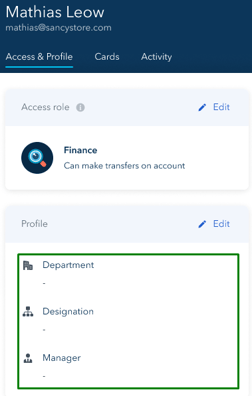
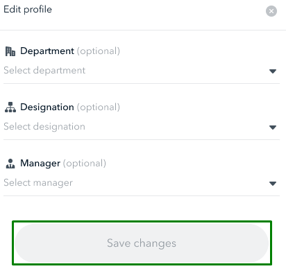
- Type in their Manager, Department and Designation on each field, then hit "Save changes"
Questions? Please log in to the app and reach out in the chat at the bottom right corner of the screen.
Suggestions? Let us know here.