---
title: How to automate or manually send bulk receipt requests on outbound transactions?
description: Admins, Finance and Budget Owners can either automate or manually send notifications to request users to add receipts to their outbound transactions.
---
[Skip to content](https://support.aspireapp.com/migration/trial/how-to-automate-or-manually-send-bulk-receipt-requests-on-outbound-transactions#main-content)
English
Show submenu for translations
![Circle-2.png\]](https://support.aspireapp.com/hs-fs/hubfs/Circle-2.png?height=200&name=Circle-2.png)
Open main navigation
Close main navigation
- English
Show submenu for translations
- Go to aspireapp.com
Go to aspireapp.com
Hello. How can we help you?
- There are no suggestions because the search field is empty.
1. [Trial](https://support.aspireapp.com/migration/trial?hsLang=en)
2. [Accounting Integrations](https://support.aspireapp.com/migration/trial/accounting-integrations?hsLang=en)
3. [Export Data](https://support.aspireapp.com/migration/trial/accounting-integrations?hsLang=en#export-data)
# How to automate or manually send bulk receipt requests on outbound transactions?
## Admins, Finance and Budget Owners can either automate or manually send notifications to request users to add receipts to their outbound transactions.
Click the links below to learn how to do this in-app:
- [**Automate receipt request**](https://support.aspireapp.com/migration/trial/how-to-automate-or-manually-send-bulk-receipt-requests-on-outbound-transactions#AutoReceipt)
- [**Manually send bulk receipt request**](https://support.aspireapp.com/migration/trial/how-to-automate-or-manually-send-bulk-receipt-requests-on-outbound-transactions#ManualBulk)
### How to automate receipt request
Enabling this automation feature can only be done by Admin users. If there are multiple admins on the account and one of them activates this automation, it will be applied to the entire Aspire account.
Learn how to enable this automation feature in-app by watching our video guide or following our step-by-step instructions below:
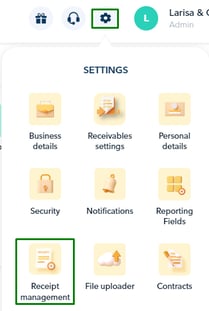
1. On the upper right part of the page, go to "**Settings**", then select "**Receipt Management**"
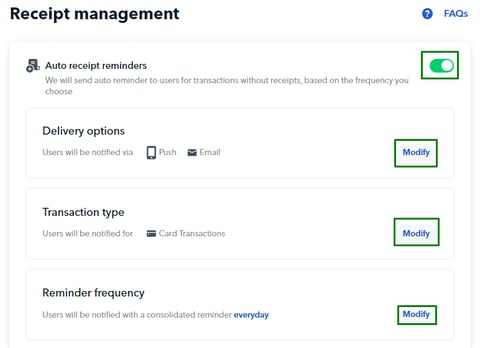
2. Tick on "**Auto receipt reminders**" toggle, and that's it!
3. You can also customize the notification details by clicking the "**Modify**" button right next to:
1. **Delivery options** - choose whether the reminder is sent via Push, SMS or Email notification
2. **Transaction type** - choose whether you want to send reminders for transfers or card transactions**\***
3. **Reminder frequency** - choose whether the reminder will be sent to the users on a daily, weekly, or monthly basis
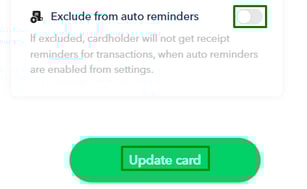
**Note!** If you prefer NOT to send auto-receipt reminders for specific cards, you can easily exclude them by navigating to the Cards Page, selecting the specific card, and clicking on the card details page.
Then, simply toggle on the "**Exclude from auto reminders**" button.
### How to manually send bulk receipt request
1. For **desktop version**, click "**Transactions**" on the left side of the homepage
2. For **mobile apps**, click the **menu** button, then select "**Transactions**" under **Overview** section
3. Click on "**Request missing receipts**"
4. Choose the transactions you would like to request receipts
5. Click on "**Request receipts**", and you're done!
Users will receive an email notification requesting them to attach receipts to their debit transactions.
**Questions?** Please log in to the app and reach out in the chat at the bottom right corner of the screen.
---
**Suggestions?** Let us know [here](https://share.hsforms.com/1X4gc3uK1RQmgwTGVnQJg0Qclt5p?referring_page_website_from_form=How%20to%20automate%20or%20manually%20send%20bulk%20receipt%20requests%20on%20outbound%20transactions?).
- [Account Management](https://support.aspireapp.com/migration/trial/account-management?hsLang=en#main-content)
- [Notification Settings](https://support.aspireapp.com/migration/trial/account-management?hsLang=en#notification-settings)
- [Multi-User Access](https://support.aspireapp.com/migration/trial/account-management?hsLang=en#multi-user-access)
- [Account Details](https://support.aspireapp.com/migration/trial/account-management?hsLang=en#account-details)
- [Account Opening & Eligibility](https://support.aspireapp.com/migration/trial/account-management?hsLang=en#account-opening-eligibility)
- [Approval Policy](https://support.aspireapp.com/migration/trial/account-management?hsLang=en#approval-policy)
- [Account Closure](https://support.aspireapp.com/migration/trial/account-management?hsLang=en#account-closure)
- [DBS USD Account](https://support.aspireapp.com/migration/trial/dbs-usd-account?hsLang=en#main-content)
- [Send Money](https://support.aspireapp.com/migration/trial/dbs-usd-account?hsLang=en#send-money)
- [Receive Money](https://support.aspireapp.com/migration/trial/dbs-usd-account?hsLang=en#receive-money)
- [General Information](https://support.aspireapp.com/migration/trial/dbs-usd-account?hsLang=en#general-information)
- [Cards](https://support.aspireapp.com/migration/trial/cards?hsLang=en#main-content)
- [Advance Cards](https://support.aspireapp.com/migration/trial/cards?hsLang=en#advance-cards)
- [General Card Information](https://support.aspireapp.com/migration/trial/cards?hsLang=en#general-card-information)
- [Physical Card](https://support.aspireapp.com/migration/trial/cards?hsLang=en#physical-card)
- [Debit Cards](https://support.aspireapp.com/migration/trial/cards?hsLang=en#debit-cards)
- [Aspire USD Account](https://support.aspireapp.com/migration/trial/aspire-usd-account?hsLang=en#main-content)
- [Send Money](https://support.aspireapp.com/migration/trial/aspire-usd-account?hsLang=en#send-money)
- [About your Aspire USD Account](https://support.aspireapp.com/migration/trial/aspire-usd-account?hsLang=en#about-your-aspire-usd-account)
- [Receive Money](https://support.aspireapp.com/migration/trial/aspire-usd-account?hsLang=en#receive-money)
- [Managing your Aspire USD Account](https://support.aspireapp.com/migration/trial/aspire-usd-account?hsLang=en#managing-your-aspire-usd-account)
- [Eligibility](https://support.aspireapp.com/migration/trial/aspire-usd-account?hsLang=en#eligibility)
- [Uncategorized](https://support.aspireapp.com/migration/trial/uncategorized?hsLang=en)
- [IDR Account](https://support.aspireapp.com/migration/trial/idr-account?hsLang=en#main-content)
- [All about IDR Account](https://support.aspireapp.com/migration/trial/idr-account?hsLang=en#all-about-idr-account)
- [Send Money](https://support.aspireapp.com/migration/trial/idr-account?hsLang=en#send-money)
- [Receive Money](https://support.aspireapp.com/migration/trial/idr-account?hsLang=en#receive-money)
- [Managing IDR Account](https://support.aspireapp.com/migration/trial/idr-account?hsLang=en#managing-idr-account)
- [Integrations](https://support.aspireapp.com/migration/trial/idr-account?hsLang=en#integrations)
- [Revenue Management](https://support.aspireapp.com/migration/trial/revenue-management?hsLang=en#main-content)
- [Invoice Management](https://support.aspireapp.com/migration/trial/revenue-management?hsLang=en#invoice-management)
- [Spend Management](https://support.aspireapp.com/migration/trial/spend-management?hsLang=en#main-content)
- [Bills](https://support.aspireapp.com/migration/trial/spend-management?hsLang=en#bills)
- [Claims](https://support.aspireapp.com/migration/trial/spend-management?hsLang=en#claims)
- [Budgets](https://support.aspireapp.com/migration/trial/spend-management?hsLang=en#budgets)
- [Credit for Working Capital](https://support.aspireapp.com/migration/trial/spend-management?hsLang=en#credit-for-working-capital)
- [Account Opening](https://support.aspireapp.com/migration/trial/account-opening?hsLang=en#main-content)
- [Account Opening & Eligibility](https://support.aspireapp.com/migration/trial/account-opening?hsLang=en#account-opening-eligibility)
- [About Us](https://support.aspireapp.com/migration/trial/account-opening?hsLang=en#about-us)
- [SGD Account](https://support.aspireapp.com/migration/trial/sgd-account?hsLang=en#main-content)
- [Receive Internationally](https://support.aspireapp.com/migration/trial/sgd-account?hsLang=en#receive-internationally)
- [General](https://support.aspireapp.com/migration/trial/sgd-account?hsLang=en#general)
- [Send Internationally](https://support.aspireapp.com/migration/trial/sgd-account?hsLang=en#send-internationally)
- [Send & Receive PayNow Locally](https://support.aspireapp.com/migration/trial/sgd-account?hsLang=en#send-receive-paynow-locally)
- [Send Locally](https://support.aspireapp.com/migration/trial/sgd-account?hsLang=en#send-locally)
- [Receive Locally](https://support.aspireapp.com/migration/trial/sgd-account?hsLang=en#receive-locally)
- [Payment Platforms](https://support.aspireapp.com/migration/trial/payment-platforms?hsLang=en#main-content)
- [PayPal](https://support.aspireapp.com/migration/trial/payment-platforms?hsLang=en#paypal)
- [Qoo10](https://support.aspireapp.com/migration/trial/payment-platforms?hsLang=en#qoo10)
- [Shopify](https://support.aspireapp.com/migration/trial/payment-platforms?hsLang=en#shopify)
- [Shopee](https://support.aspireapp.com/migration/trial/payment-platforms?hsLang=en#shopee)
- [Etsy](https://support.aspireapp.com/migration/trial/payment-platforms?hsLang=en#etsy)
- [Stripe](https://support.aspireapp.com/migration/trial/payment-platforms?hsLang=en#stripe)
- [Lazada](https://support.aspireapp.com/migration/trial/payment-platforms?hsLang=en#lazada)
- [Apple App Store](https://support.aspireapp.com/migration/trial/payment-platforms?hsLang=en#apple-app-store)
- [Accounting Integrations](https://support.aspireapp.com/migration/trial/accounting-integrations?hsLang=en#main-content)
- [Export Data](https://support.aspireapp.com/migration/trial/accounting-integrations?hsLang=en#export-data)
- [QuickBooks](https://support.aspireapp.com/migration/trial/accounting-integrations?hsLang=en#quickbooks)
- [NetSuite](https://support.aspireapp.com/migration/trial/accounting-integrations?hsLang=en#netsuite)
- [Category Management](https://support.aspireapp.com/migration/trial/accounting-integrations?hsLang=en#category-management)
- [Xero](https://support.aspireapp.com/migration/trial/accounting-integrations?hsLang=en#xero)
- [Accurate](https://support.aspireapp.com/migration/trial/accounting-integrations?hsLang=en#accurate)
- [Zoho Expense](https://support.aspireapp.com/migration/trial/accounting-integrations?hsLang=en#zoho-expense)
- [Jurnal](https://support.aspireapp.com/migration/trial/accounting-integrations?hsLang=en#jurnal)
- [SAP Business One](https://support.aspireapp.com/migration/trial/accounting-integrations?hsLang=en#sap-business-one)
- [Safety and Security](https://support.aspireapp.com/migration/trial/safety-and-security?hsLang=en#main-content)
- [Other Queries](https://support.aspireapp.com/migration/trial/safety-and-security?hsLang=en#other-queries)
- [Funds Safety](https://support.aspireapp.com/migration/trial/safety-and-security?hsLang=en#funds-safety)
- [Personal Data Protection Act (PDPA)](https://support.aspireapp.com/migration/trial/safety-and-security?hsLang=en#personal-data-protection-act-pdpa)
- [Security and Fraud Controls](https://support.aspireapp.com/migration/trial/safety-and-security?hsLang=en#security-and-fraud-controls)
- [Incorporation](https://support.aspireapp.com/migration/trial/incorporation?hsLang=en)
- [Subscription Plan](https://support.aspireapp.com/migration/trial/subscription-plan?hsLang=en#main-content)
- [Billing](https://support.aspireapp.com/migration/trial/subscription-plan?hsLang=en#billing)
- [Services & Value](https://support.aspireapp.com/migration/trial/subscription-plan?hsLang=en#services-value)
- [Promotions](https://support.aspireapp.com/migration/trial/subscription-plan?hsLang=en#promotions)
- [Others](https://support.aspireapp.com/migration/trial/others?hsLang=en)
[](https://aspireapp.com)
aspireapp.com Help Center
Copyright © 2026, Aspire
```json
{
"@context" : "https://schema.org",
"@type" : "VideoObject",
"contentUrl" : "https://21172957.fs1.hubspotusercontent-na1.net/hubfs/21172957/Auto-receipt%20Reminder%20Guide.mp4",
"dateModified" : "2025-04-22T11:10:03.545Z",
"duration" : "PT1M59.12S",
"height" : 1080,
"name" : "Auto-receipt Reminder Guide",
"thumbnailUrl" : "https://21172957.fs1.hubspotusercontent-na1.net/hubfs/21172957/Auto-receipt%20Reminder%20Guide.mp4/medium.jpg",
"uploadDate" : "2023-06-21T14:05:51.403Z",
"width" : 1920
}
```
```json
{
"@context" : "https://schema.org",
"@type" : "VideoObject",
"contentUrl" : "https://21172957.fs1.hubspotusercontent-na1.net/hubfs/21172957/Bulk%20request%20receipts.mp4",
"dateModified" : "2023-05-10T06:27:59.829Z",
"duration" : "PT16S",
"height" : 1620,
"name" : "Bulk request receipts",
"thumbnailUrl" : "https://21172957.fs1.hubspotusercontent-na1.net/hubfs/21172957/Bulk%20request%20receipts.mp4/medium.jpg",
"uploadDate" : "2023-05-10T06:27:51.757Z",
"width" : 1080
}
```