---
title: What data can I export on my Aspire Account?
description: As of March 2023, Aspire Account users can export various types of data directly.
---
[Skip to content](https://support.aspireapp.com/migration/faq/id/what-data-can-i-export-on-my-aspire-account#main-content)
- [English](https://support.aspireapp.com/migration/faq/id/what-data-can-i-export-on-my-aspire-account)
- [Bahasa Indonesia](https://support.aspireapp.com/migration/id/faq/id/data-apa-yang-dapat-saya-ekspor-dari-akun-aspire-saya)
English
Show submenu for translations
![Aspire Logo 202011-Sep-07-2023-03-11-02-4248-AM.webp\]](https://support.aspireapp.com/hs-fs/hubfs/Aspire%20Logo%20202011-Sep-07-2023-03-11-02-4248-AM.webp?height=40&name=Aspire%20Logo%20202011-Sep-07-2023-03-11-02-4248-AM.webp)
Open main navigation
Close main navigation
- - [English](https://support.aspireapp.com/migration/faq/id/what-data-can-i-export-on-my-aspire-account)
- [Bahasa Indonesia](https://support.aspireapp.com/migration/id/faq/id/data-apa-yang-dapat-saya-ekspor-dari-akun-aspire-saya)
English
Show submenu for translations
- [Go to aspireapp.com/id](https://aspireapp.com/id)
[Go to aspireapp.com/id](https://aspireapp.com/id)
How can we help?
- There are no suggestions because the search field is empty.
1. [Aspire FAQs - Indonesia](https://support.aspireapp.com/migration/faq/id?hsLang=en)
2. [Accounting Integrations](https://support.aspireapp.com/migration/faq/id/accounting-integrations?hsLang=en)
3. [Export Data](https://support.aspireapp.com/migration/faq/id/accounting-integrations?hsLang=en#export-data)
# What data can I export on my Aspire Account?
As of March 2023, Aspire Account users can export various types of data directly.
**Admin and Finance users** have access to everything, while **Employee users** can only export their own transactions data.
To learn how to export, simply click on the provided link:
- [**Account Statements**](https://support.aspireapp.com/migration/faq/id/what-data-can-i-export-on-my-aspire-account#AcctStatements)
- [**Budgets Data**](https://support.aspireapp.com/migration/faq/id/what-data-can-i-export-on-my-aspire-account#Budgets)
- [**Cards Data**](https://support.aspireapp.com/migration/faq/id/what-data-can-i-export-on-my-aspire-account#Cards)
- [**Invoices Data**](https://support.aspireapp.com/migration/faq/id/what-data-can-i-export-on-my-aspire-account#Invoices)
- [**Claims Data**](https://support.aspireapp.com/migration/faq/id/what-data-can-i-export-on-my-aspire-account#Claims)
- [**Expenses Data**](https://support.aspireapp.com/migration/faq/id/what-data-can-i-export-on-my-aspire-account#Expenses)
- [**Bills**](https://support.aspireapp.com/migration/faq/id/what-data-can-i-export-on-my-aspire-account#bills)
- [**Payment links**](https://support.aspireapp.com/migration/faq/id/what-data-can-i-export-on-my-aspire-account#PL)
- [**Users**](https://support.aspireapp.com/migration/faq/id/what-data-can-i-export-on-my-aspire-account#users)
**Note!** If your exported data contains more than 500 rows, it will be sent to your email. If you don't see the export in your inbox right away, please wait for 60 seconds and check your email again.
### How to export Account Statements
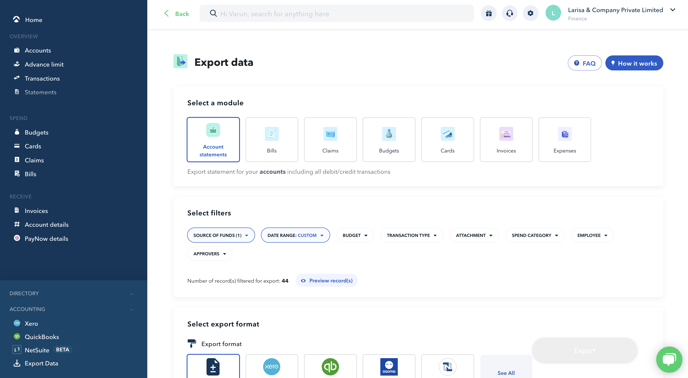
1. Click on "**Transactions**" and then "**Export**" or you can directly click on **Export Data** under **ACCOUNTING** on the left side menu on Aspire
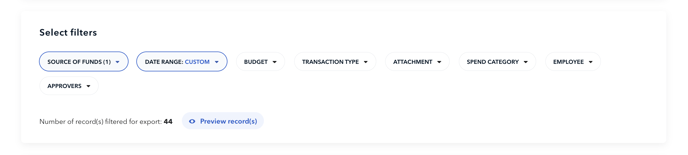
2. Apply the **filters** for your data, including account, date, transaction type and more
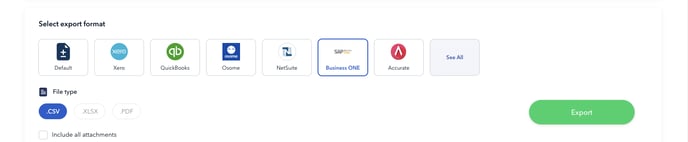
3. Select the **Export Format and FileType**. Formats available are Deskera, Freshbooks, Jurnal, Peak, Sage 50, Wave, Zahir, Zoho Books, Xero, QuickBooks, Osome, NetSuite, SAP Business one, and Accurate.
**Tip!** To simplify your accounting process, you can directly import the exported files into the Bank Statement or Bank Feed section of your accounting tool, specific to your bank accounts.
**Note:** You can **only** export your account statement within a **certain period** when you have made a transaction.
For an **empty account statement**, please reach out to our **Care team** via the **chatbox,** by also providing the **statement period** that you would like to see in the letter.
---
### How to export Budgets Data
1. Under **ACCOUNTING,** click on "**Export Data**" on the left side menu panel.

2. Click on "**Budgets**" section

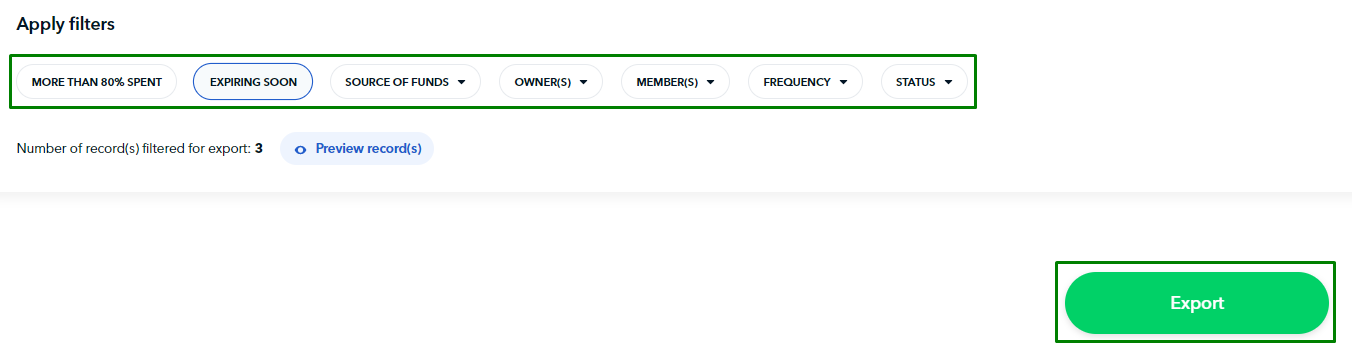
3. Apply the relevant filters to your data and export in the .CSV format
---
### How to export Cards Data
1. Under **ACCOUNTING,** click on "**Export Data**" on the left side menu panel

2. Click on "**Cards**" section

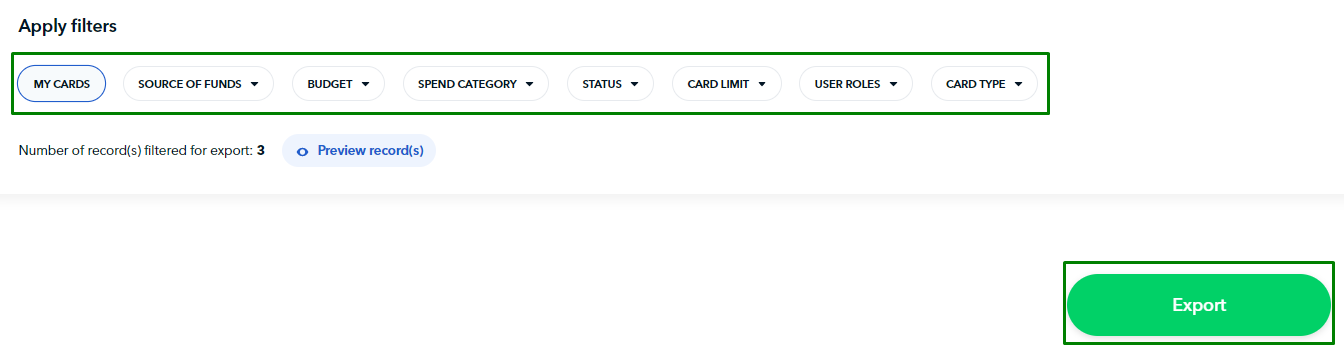
3. Apply the relevant filters to your data and export in the .CSV format
---
### How to export Invoices Data
1. Under **ACCOUNTING,** click on "**Export Data**" on the left side menu panel

2. Click on "**Invoices**" section
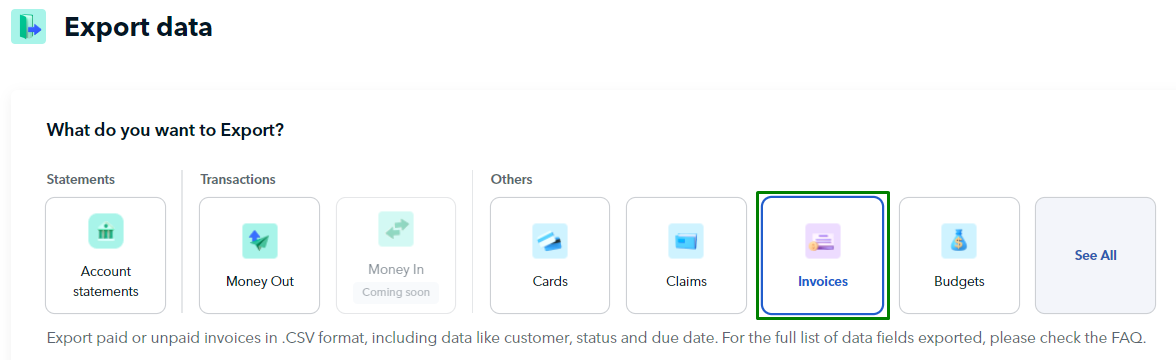
3. Apply the relevant filters to your data and then export in .CSV format

**Tip!** By importing the exported .CSV file directly into your accounting tool's Invoices/Receivables section, you can easily track your account receivables data. This will help you stay on top of your finances and save you time.
---
### How to export Claims Data
1. Under **ACCOUNTING,** click on "**Export Data**" on the left side menu panel

2. Click on "**Claims**" section
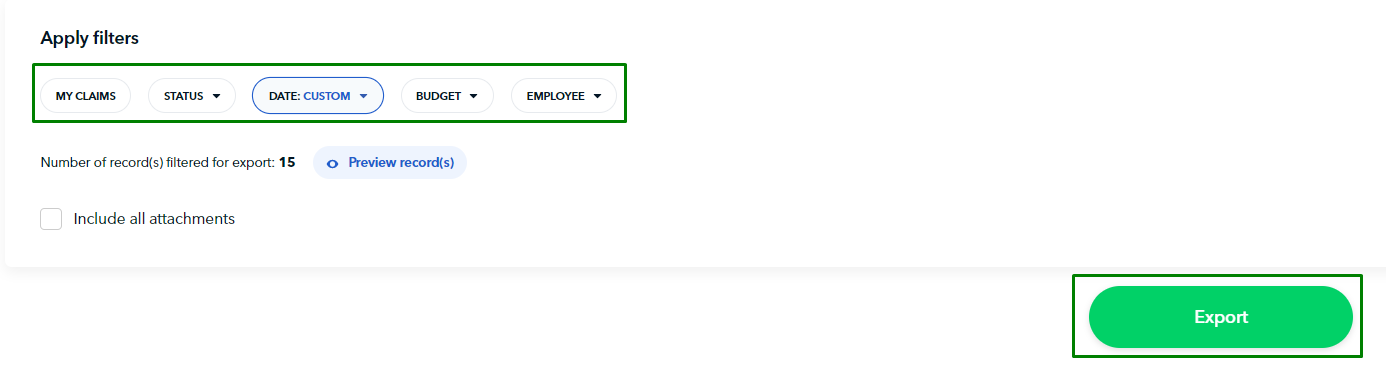
3. Apply the relevant filters to your data and export in the .CSV format
---
### How to export Expenses Data
1. Under **ACCOUNTING,** click on "**Export Data**" on the left side menu panel

2. Click on "**Money Out**" section

3. Apply the relevant filters to your data, and select your export format. Formats available are Netsuite, Quickbooks, Jurnal, Zoho Expense, and SAP business one.

**Tip!** By importing the exported transactions directly into your accounting tool's Expenses section, you can reconcile your accounts quickly and efficiently. This will save you time and help you stay on top of your finances.
---
### How to export Bills Data
1. Under **ACCOUNTING,** click on "**Export Data**" on the left side menu panel

2. Click on "**Bills**" section

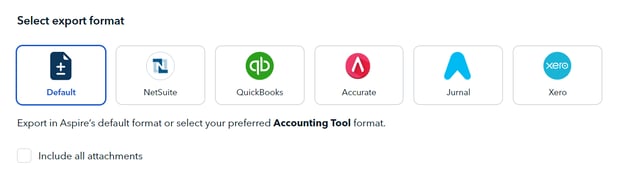
3. Apply the relevant filters to your data, and select your export format. Formats available are Netsuite, Quickbooks, Accurate, Journal, and Xero.
---
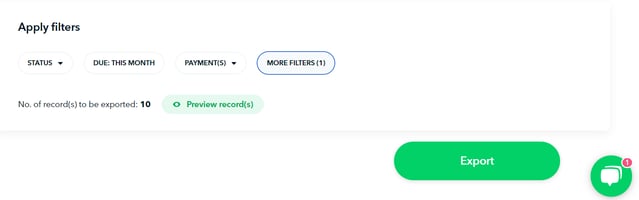
### How to export Payment Links Data
1. Under **ACCOUNTING,** click on "**Export Data"**
2. Click on **"See All",** and then select "**Payment Links"
**
3. Apply relevant filters to your data before exporting
---
### How to export Users Data
1. Under **ACCOUNTING,** click on "**Export Data"**
2. Click on **"See All",** and then select "**Payment Links"
-1.png?width=407&height=457&name=Screenshot-2023-08-03-201214%20(1)-1.png)**
3. Apply relevant filters to your data before exporting

**Questions?** Please log in to the app and reach out in the chat at the bottom right corner of the screen.
---
**Suggestions?** Let us know [here](https://share.hsforms.com/1X4gc3uK1RQmgwTGVnQJg0Qclt5p?referring_page_website_from_form=What%20data%20can%20I%20export%20on%20my%20Aspire%20Account?).
- [Account Opening](https://support.aspireapp.com/migration/faq/id/account-opening?hsLang=en#main-content)
- [About Us](https://support.aspireapp.com/migration/faq/id/account-opening?hsLang=en#about-us)
- [Account Opening & Eligibility](https://support.aspireapp.com/migration/faq/id/account-opening?hsLang=en#account-opening-eligibility)
- [Other FAQs](https://support.aspireapp.com/migration/faq/id/account-opening?hsLang=en#other-faqs)
- [Account Management](https://support.aspireapp.com/migration/faq/id/account-management?hsLang=en#main-content)
- [Notification Settings](https://support.aspireapp.com/migration/faq/id/account-management?hsLang=en#notification-settings)
- [Multi-User Access](https://support.aspireapp.com/migration/faq/id/account-management?hsLang=en#multi-user-access)
- [Account Details](https://support.aspireapp.com/migration/faq/id/account-management?hsLang=en#account-details)
- [Account Closure](https://support.aspireapp.com/migration/faq/id/account-management?hsLang=en#account-closure)
- [Approval Policy](https://support.aspireapp.com/migration/faq/id/account-management?hsLang=en#approval-policy)
- [Account Analytics](https://support.aspireapp.com/migration/faq/id/account-management?hsLang=en#account-analytics)
- [Receipt Management](https://support.aspireapp.com/migration/faq/id/receipt-management?hsLang=en)
- [SGD Account](https://support.aspireapp.com/migration/faq/id/sgd-account?hsLang=en#main-content)
- [General](https://support.aspireapp.com/migration/faq/id/sgd-account?hsLang=en#general)
- [Send Locally](https://support.aspireapp.com/migration/faq/id/sgd-account?hsLang=en#send-locally)
- [Receive Locally](https://support.aspireapp.com/migration/faq/id/sgd-account?hsLang=en#receive-locally)
- [Send Internationally](https://support.aspireapp.com/migration/faq/id/sgd-account?hsLang=en#send-internationally)
- [Receive Internationally](https://support.aspireapp.com/migration/faq/id/sgd-account?hsLang=en#receive-internationally)
- [USD Account](https://support.aspireapp.com/migration/faq/id/usd-account?hsLang=en#main-content)
- [About your Aspire USD Account](https://support.aspireapp.com/migration/faq/id/usd-account?hsLang=en#about-your-aspire-usd-account)
- [Eligibility](https://support.aspireapp.com/migration/faq/id/usd-account?hsLang=en#eligibility)
- [Managing your Aspire USD Account](https://support.aspireapp.com/migration/faq/id/usd-account?hsLang=en#managing-your-aspire-usd-account)
- [Send Money](https://support.aspireapp.com/migration/faq/id/usd-account?hsLang=en#send-money)
- [Receive Money](https://support.aspireapp.com/migration/faq/id/usd-account?hsLang=en#receive-money)
- [IDR Account](https://support.aspireapp.com/migration/faq/id/idr-account?hsLang=en#main-content)
- [All about IDR Account](https://support.aspireapp.com/migration/faq/id/idr-account?hsLang=en#all-about-idr-account)
- [Managing IDR Account](https://support.aspireapp.com/migration/faq/id/idr-account?hsLang=en#managing-idr-account)
- [Send Money](https://support.aspireapp.com/migration/faq/id/idr-account?hsLang=en#send-money)
- [Receive Money](https://support.aspireapp.com/migration/faq/id/idr-account?hsLang=en#receive-money)
- [EUR Account](https://support.aspireapp.com/migration/faq/id/eur-account?hsLang=en#main-content)
- [Eligibility](https://support.aspireapp.com/migration/faq/id/eur-account?hsLang=en#eligibility)
- [About your Aspire EUR Account](https://support.aspireapp.com/migration/faq/id/eur-account?hsLang=en#about-your-aspire-eur-account)
- [Send Money](https://support.aspireapp.com/migration/faq/id/eur-account?hsLang=en#send-money)
- [Receive Money](https://support.aspireapp.com/migration/faq/id/eur-account?hsLang=en#receive-money)
- [GBP Account](https://support.aspireapp.com/migration/faq/id/gbp-account?hsLang=en#main-content)
- [Eligibility](https://support.aspireapp.com/migration/faq/id/gbp-account?hsLang=en#eligibility)
- [About your Aspire GBP Account](https://support.aspireapp.com/migration/faq/id/gbp-account?hsLang=en#about-your-aspire-gbp-account)
- [Send Money](https://support.aspireapp.com/migration/faq/id/gbp-account?hsLang=en#send-money)
- [Receive Money](https://support.aspireapp.com/migration/faq/id/gbp-account?hsLang=en#receive-money)
- [Cards](https://support.aspireapp.com/migration/faq/id/cards?hsLang=en#main-content)
- [General Card Information](https://support.aspireapp.com/migration/faq/id/cards?hsLang=en#general-card-information)
- [Physical Card](https://support.aspireapp.com/migration/faq/id/cards?hsLang=en#physical-card)
- [Advance Cards](https://support.aspireapp.com/migration/faq/id/cards?hsLang=en#advance-cards)
- [Debit Cards](https://support.aspireapp.com/migration/faq/id/cards?hsLang=en#debit-cards)
- [Spend Management](https://support.aspireapp.com/migration/faq/id/spend-management?hsLang=en#main-content)
- [Bills](https://support.aspireapp.com/migration/faq/id/spend-management?hsLang=en#bills)
- [Budgets](https://support.aspireapp.com/migration/faq/id/spend-management?hsLang=en#budgets)
- [Claims](https://support.aspireapp.com/migration/faq/id/spend-management?hsLang=en#claims)
- [Revenue Management](https://support.aspireapp.com/migration/faq/id/revenue-management?hsLang=en#main-content)
- [General](https://support.aspireapp.com/migration/faq/id/revenue-management?hsLang=en#general)
- [Invoices](https://support.aspireapp.com/migration/faq/id/revenue-management?hsLang=en#invoices)
- [Payment Link](https://support.aspireapp.com/migration/faq/id/revenue-management?hsLang=en#payment-link)
- [Payment Gateway](https://support.aspireapp.com/migration/faq/id/revenue-management?hsLang=en#payment-gateway)
- [Accounting Integrations](https://support.aspireapp.com/migration/faq/id/accounting-integrations?hsLang=en#main-content)
- [Category Management](https://support.aspireapp.com/migration/faq/id/accounting-integrations?hsLang=en#category-management)
- [Export Data](https://support.aspireapp.com/migration/faq/id/accounting-integrations?hsLang=en#export-data)
- [QuickBooks](https://support.aspireapp.com/migration/faq/id/accounting-integrations?hsLang=en#quickbooks)
- [NetSuite](https://support.aspireapp.com/migration/faq/id/accounting-integrations?hsLang=en#netsuite)
- [Zoho Expense](https://support.aspireapp.com/migration/faq/id/accounting-integrations?hsLang=en#zoho-expense)
- [Xero](https://support.aspireapp.com/migration/faq/id/accounting-integrations?hsLang=en#xero)
- [SAP Business One](https://support.aspireapp.com/migration/faq/id/accounting-integrations?hsLang=en#sap-business-one)
- [Jurnal](https://support.aspireapp.com/migration/faq/id/accounting-integrations?hsLang=en#jurnal)
- [Accurate](https://support.aspireapp.com/migration/faq/id/accounting-integrations?hsLang=en#accurate)
- [Subscription Plan](https://support.aspireapp.com/migration/faq/id/subscription-plan?hsLang=en#main-content)
- [Services & Value](https://support.aspireapp.com/migration/faq/id/subscription-plan?hsLang=en#services-value)
- [Billing](https://support.aspireapp.com/migration/faq/id/subscription-plan?hsLang=en#billing)
- [Payment Platforms](https://support.aspireapp.com/migration/faq/id/payment-platforms?hsLang=en#main-content)
- [Qoo10](https://support.aspireapp.com/migration/faq/id/payment-platforms?hsLang=en#qoo10)
- [Shopify](https://support.aspireapp.com/migration/faq/id/payment-platforms?hsLang=en#shopify)
- [Lazada](https://support.aspireapp.com/migration/faq/id/payment-platforms?hsLang=en#lazada)
- [PayPal](https://support.aspireapp.com/migration/faq/id/payment-platforms?hsLang=en#paypal)
- [Shopee](https://support.aspireapp.com/migration/faq/id/payment-platforms?hsLang=en#shopee)
- [Stripe](https://support.aspireapp.com/migration/faq/id/payment-platforms?hsLang=en#stripe)
- [Apple App Store](https://support.aspireapp.com/migration/faq/id/payment-platforms?hsLang=en#apple-app-store)
- [Safety and Security](https://support.aspireapp.com/migration/faq/id/safety-and-security?hsLang=en#main-content)
- [Funds Safety](https://support.aspireapp.com/migration/faq/id/safety-and-security?hsLang=en#funds-safety)
- [Security and Fraud Controls](https://support.aspireapp.com/migration/faq/id/safety-and-security?hsLang=en#security-and-fraud-controls)
- [Personal Data Protection Act (PDPA)](https://support.aspireapp.com/migration/faq/id/safety-and-security?hsLang=en#personal-data-protection-act-pdpa)
- [Other Queries](https://support.aspireapp.com/migration/faq/id/safety-and-security?hsLang=en#other-queries)
- [Others](https://support.aspireapp.com/migration/faq/id/others?hsLang=en)
[](https://aspireapp.com)
[mailto:email@email.com](mailto:email@email.com)
Copyright © 2026, Aspire