---
title: How to sync expenses with Xero?
description: The Sync expense for Xero is a feature that allows you to sync any expense directly from Aspire to Xero.
---
[Skip to content](https://support.aspireapp.com/migration/faq/id/how-to-sync-expenses-with-xero#main-content)
- [English](https://support.aspireapp.com/migration/faq/id/how-to-sync-expenses-with-xero)
- [Bahasa Indonesia](https://support.aspireapp.com/migration/id/faq/id/bagaimana-cara-menyinkronkan-pengeluaran-dengan-xero)
English
Show submenu for translations
![Aspire Logo 202011-Sep-07-2023-03-11-02-4248-AM.webp\]](https://support.aspireapp.com/hs-fs/hubfs/Aspire%20Logo%20202011-Sep-07-2023-03-11-02-4248-AM.webp?height=40&name=Aspire%20Logo%20202011-Sep-07-2023-03-11-02-4248-AM.webp)
Open main navigation
Close main navigation
- - [English](https://support.aspireapp.com/migration/faq/id/how-to-sync-expenses-with-xero)
- [Bahasa Indonesia](https://support.aspireapp.com/migration/id/faq/id/bagaimana-cara-menyinkronkan-pengeluaran-dengan-xero)
English
Show submenu for translations
- [Go to aspireapp.com/id](https://aspireapp.com/id)
[Go to aspireapp.com/id](https://aspireapp.com/id)
How can we help?
- There are no suggestions because the search field is empty.
1. [Aspire FAQs - Indonesia](https://support.aspireapp.com/migration/faq/id?hsLang=en)
2. [Accounting Integrations](https://support.aspireapp.com/migration/faq/id/accounting-integrations?hsLang=en)
3. [Xero](https://support.aspireapp.com/migration/faq/id/accounting-integrations?hsLang=en#xero)
# How to sync expenses with Xero?
**What is the Sync Expense feature for Xero?**
The Sync expense for Xero is a feature that allows you to sync any expense directly from Aspire to Xero. You will be able to create Spend money transactions on Xero, including all expense details and attachments.
All you have to now do is reconcile the expense on Xero!
**Who can use the Sync expenses feature with Xero?**
Any user who has access to the accounting features, i.e Admins and Finance users can access the Sync expenses feature
**What are the fields that will be synced with Xero, when using Sync expenses?**
You will be able to review and fill all the fields that you need to create a Spend Money transaction on Xero, including the Xero account, Tax rate, and Xero tracking categories, directly from Aspire before you sync a transaction. All values along with the receipts attached to the transaction will be synced with Xero
#### **How to set up the Xero Expense Sync in Aspire**
**1. Access the Sync expenses workflow**
****
The Sync expenses feature can be accessed from the [Xero homepage](https://app.aspireapp.com/sg/dashboard/debit/transactions/export/integration/xero), once you have connected your Aspire account to Xero.
**2. Map your Xero accounts to Aspire Categories**
**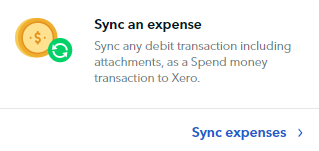**
Click on the **Sync an expense** tab. You will then be asked to Map your Xero accounts:
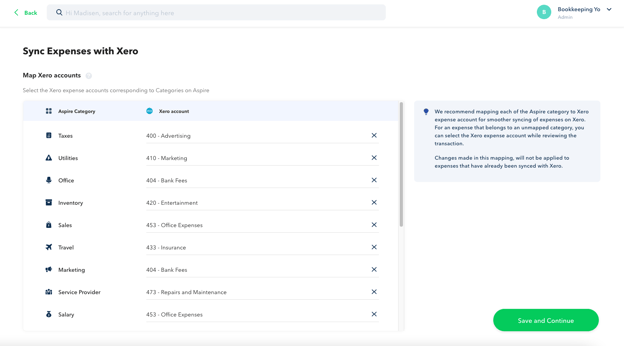
You can set up a mapping between your Aspire categories and your Xero chart of accounts on this screen.
Once you map a Xero account to an Aspire category, any expense in that category will automatically be linked to the mapped Xero account.
You can always update the Xero account for any individual transaction or update this mapping later.
**3. Review and Sync your transactions**
The Sync expenses workflow has two different statuses - **Pending Sync** and **Synced**. You can switch between these tabs at any time
Under **Pending Sync**, you can **edit the transaction's expense details** before they are synced to Xero. Follow this step-by-step:
1. 1. Select the transaction that you want to edit
2. Update the field values.
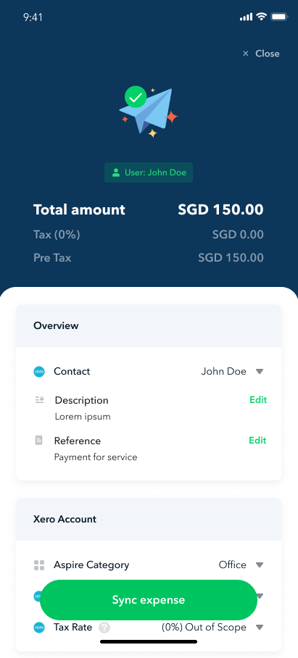
3. Once you are done, you can click on **"Sync expense".** This will sync your transaction to Xero and move it to the **Synced** tab.
You can also **select multiple transactions** and sync them directly to Xero. Follow the steps by steps below:
1. 1. Click on **Transactions** under **Overview** Tab
2. Click **Sync Expenses to Xero
%20(1).png?width=688&height=387&name=258%20(1)%20(1).png)**
3. Under **Pending Sync**, select the transactions that you want to sync. Once selected, click on **Sync Expenses
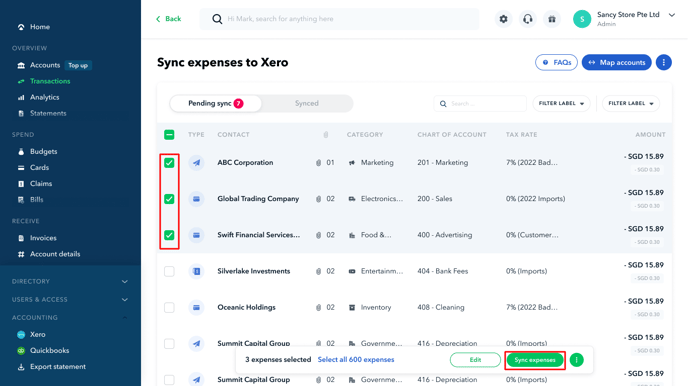**
4. Once transactions are synced, they will be moved to the **Synced** tab
.png?width=611&height=344&name=142-1-1-%20(1).png)
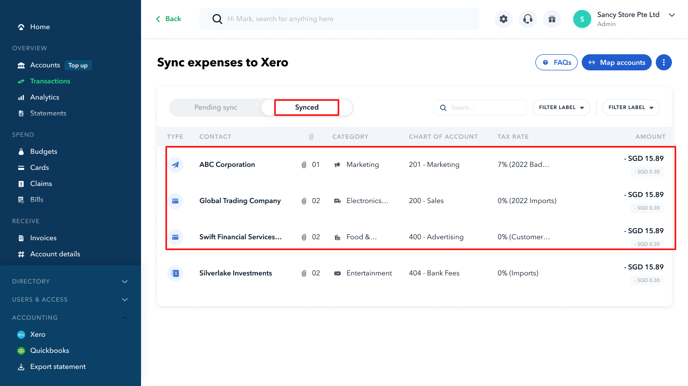
All synced transactions are created in the relevant Xero account as Spend Money transactions, along with their attachments:
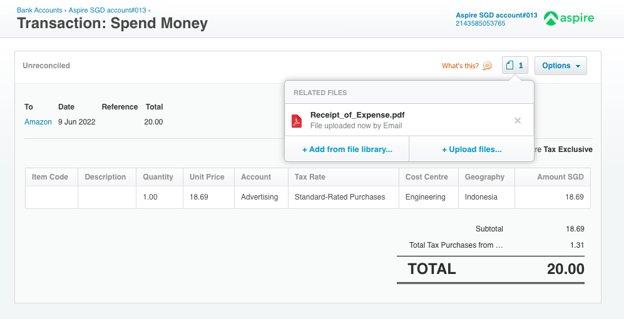
**Note:** When syncing your transactions to Xero, you can **only select a maximum of 1000 transactions** at a time.
#### **TROUBLESHOOTING**
**The expenses sync feature is disabled on my Xero homepage**
The expenses sync feature will only be available once you have connected at least one of your Aspire accounts to Xero. You can click on the Connect Now button to connect your bank accounts to Xero and sync your bank statements.
**I am unable to find some of my Xero accounts when I try to fill them in Aspire**
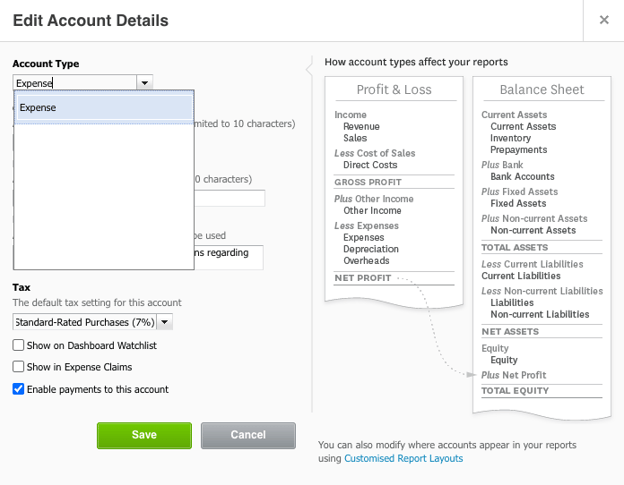
To sync expenses to a Xero account, you need to enable payments to the account. You can do this by going to the Xero Chart of accounts and selecting "Enable payments to this account" for the Xero account you want to use.
**Questions?** Please log in to the app and reach out in the chat at the bottom right corner of the screen.
---
**Suggestions?** Let us know [here](https://share.hsforms.com/1X4gc3uK1RQmgwTGVnQJg0Qclt5p?referring_page_website_from_form=How%20to%20sync%20expenses%20with%20Xero?).
- [Account Opening](https://support.aspireapp.com/migration/faq/id/account-opening?hsLang=en#main-content)
- [About Us](https://support.aspireapp.com/migration/faq/id/account-opening?hsLang=en#about-us)
- [Account Opening & Eligibility](https://support.aspireapp.com/migration/faq/id/account-opening?hsLang=en#account-opening-eligibility)
- [Other FAQs](https://support.aspireapp.com/migration/faq/id/account-opening?hsLang=en#other-faqs)
- [Account Management](https://support.aspireapp.com/migration/faq/id/account-management?hsLang=en#main-content)
- [Notification Settings](https://support.aspireapp.com/migration/faq/id/account-management?hsLang=en#notification-settings)
- [Multi-User Access](https://support.aspireapp.com/migration/faq/id/account-management?hsLang=en#multi-user-access)
- [Account Details](https://support.aspireapp.com/migration/faq/id/account-management?hsLang=en#account-details)
- [Account Closure](https://support.aspireapp.com/migration/faq/id/account-management?hsLang=en#account-closure)
- [Approval Policy](https://support.aspireapp.com/migration/faq/id/account-management?hsLang=en#approval-policy)
- [Account Analytics](https://support.aspireapp.com/migration/faq/id/account-management?hsLang=en#account-analytics)
- [Receipt Management](https://support.aspireapp.com/migration/faq/id/receipt-management?hsLang=en)
- [SGD Account](https://support.aspireapp.com/migration/faq/id/sgd-account?hsLang=en#main-content)
- [General](https://support.aspireapp.com/migration/faq/id/sgd-account?hsLang=en#general)
- [Send Locally](https://support.aspireapp.com/migration/faq/id/sgd-account?hsLang=en#send-locally)
- [Receive Locally](https://support.aspireapp.com/migration/faq/id/sgd-account?hsLang=en#receive-locally)
- [Send Internationally](https://support.aspireapp.com/migration/faq/id/sgd-account?hsLang=en#send-internationally)
- [Receive Internationally](https://support.aspireapp.com/migration/faq/id/sgd-account?hsLang=en#receive-internationally)
- [USD Account](https://support.aspireapp.com/migration/faq/id/usd-account?hsLang=en#main-content)
- [About your Aspire USD Account](https://support.aspireapp.com/migration/faq/id/usd-account?hsLang=en#about-your-aspire-usd-account)
- [Eligibility](https://support.aspireapp.com/migration/faq/id/usd-account?hsLang=en#eligibility)
- [Managing your Aspire USD Account](https://support.aspireapp.com/migration/faq/id/usd-account?hsLang=en#managing-your-aspire-usd-account)
- [Send Money](https://support.aspireapp.com/migration/faq/id/usd-account?hsLang=en#send-money)
- [Receive Money](https://support.aspireapp.com/migration/faq/id/usd-account?hsLang=en#receive-money)
- [IDR Account](https://support.aspireapp.com/migration/faq/id/idr-account?hsLang=en#main-content)
- [All about IDR Account](https://support.aspireapp.com/migration/faq/id/idr-account?hsLang=en#all-about-idr-account)
- [Managing IDR Account](https://support.aspireapp.com/migration/faq/id/idr-account?hsLang=en#managing-idr-account)
- [Send Money](https://support.aspireapp.com/migration/faq/id/idr-account?hsLang=en#send-money)
- [Receive Money](https://support.aspireapp.com/migration/faq/id/idr-account?hsLang=en#receive-money)
- [EUR Account](https://support.aspireapp.com/migration/faq/id/eur-account?hsLang=en#main-content)
- [Eligibility](https://support.aspireapp.com/migration/faq/id/eur-account?hsLang=en#eligibility)
- [About your Aspire EUR Account](https://support.aspireapp.com/migration/faq/id/eur-account?hsLang=en#about-your-aspire-eur-account)
- [Send Money](https://support.aspireapp.com/migration/faq/id/eur-account?hsLang=en#send-money)
- [Receive Money](https://support.aspireapp.com/migration/faq/id/eur-account?hsLang=en#receive-money)
- [GBP Account](https://support.aspireapp.com/migration/faq/id/gbp-account?hsLang=en#main-content)
- [Eligibility](https://support.aspireapp.com/migration/faq/id/gbp-account?hsLang=en#eligibility)
- [About your Aspire GBP Account](https://support.aspireapp.com/migration/faq/id/gbp-account?hsLang=en#about-your-aspire-gbp-account)
- [Send Money](https://support.aspireapp.com/migration/faq/id/gbp-account?hsLang=en#send-money)
- [Receive Money](https://support.aspireapp.com/migration/faq/id/gbp-account?hsLang=en#receive-money)
- [Cards](https://support.aspireapp.com/migration/faq/id/cards?hsLang=en#main-content)
- [General Card Information](https://support.aspireapp.com/migration/faq/id/cards?hsLang=en#general-card-information)
- [Physical Card](https://support.aspireapp.com/migration/faq/id/cards?hsLang=en#physical-card)
- [Advance Cards](https://support.aspireapp.com/migration/faq/id/cards?hsLang=en#advance-cards)
- [Debit Cards](https://support.aspireapp.com/migration/faq/id/cards?hsLang=en#debit-cards)
- [Spend Management](https://support.aspireapp.com/migration/faq/id/spend-management?hsLang=en#main-content)
- [Bills](https://support.aspireapp.com/migration/faq/id/spend-management?hsLang=en#bills)
- [Budgets](https://support.aspireapp.com/migration/faq/id/spend-management?hsLang=en#budgets)
- [Claims](https://support.aspireapp.com/migration/faq/id/spend-management?hsLang=en#claims)
- [Revenue Management](https://support.aspireapp.com/migration/faq/id/revenue-management?hsLang=en#main-content)
- [General](https://support.aspireapp.com/migration/faq/id/revenue-management?hsLang=en#general)
- [Invoices](https://support.aspireapp.com/migration/faq/id/revenue-management?hsLang=en#invoices)
- [Payment Link](https://support.aspireapp.com/migration/faq/id/revenue-management?hsLang=en#payment-link)
- [Payment Gateway](https://support.aspireapp.com/migration/faq/id/revenue-management?hsLang=en#payment-gateway)
- [Accounting Integrations](https://support.aspireapp.com/migration/faq/id/accounting-integrations?hsLang=en#main-content)
- [Category Management](https://support.aspireapp.com/migration/faq/id/accounting-integrations?hsLang=en#category-management)
- [Export Data](https://support.aspireapp.com/migration/faq/id/accounting-integrations?hsLang=en#export-data)
- [QuickBooks](https://support.aspireapp.com/migration/faq/id/accounting-integrations?hsLang=en#quickbooks)
- [NetSuite](https://support.aspireapp.com/migration/faq/id/accounting-integrations?hsLang=en#netsuite)
- [Zoho Expense](https://support.aspireapp.com/migration/faq/id/accounting-integrations?hsLang=en#zoho-expense)
- [Xero](https://support.aspireapp.com/migration/faq/id/accounting-integrations?hsLang=en#xero)
- [SAP Business One](https://support.aspireapp.com/migration/faq/id/accounting-integrations?hsLang=en#sap-business-one)
- [Jurnal](https://support.aspireapp.com/migration/faq/id/accounting-integrations?hsLang=en#jurnal)
- [Accurate](https://support.aspireapp.com/migration/faq/id/accounting-integrations?hsLang=en#accurate)
- [Subscription Plan](https://support.aspireapp.com/migration/faq/id/subscription-plan?hsLang=en#main-content)
- [Services & Value](https://support.aspireapp.com/migration/faq/id/subscription-plan?hsLang=en#services-value)
- [Billing](https://support.aspireapp.com/migration/faq/id/subscription-plan?hsLang=en#billing)
- [Payment Platforms](https://support.aspireapp.com/migration/faq/id/payment-platforms?hsLang=en#main-content)
- [Qoo10](https://support.aspireapp.com/migration/faq/id/payment-platforms?hsLang=en#qoo10)
- [Shopify](https://support.aspireapp.com/migration/faq/id/payment-platforms?hsLang=en#shopify)
- [Lazada](https://support.aspireapp.com/migration/faq/id/payment-platforms?hsLang=en#lazada)
- [PayPal](https://support.aspireapp.com/migration/faq/id/payment-platforms?hsLang=en#paypal)
- [Shopee](https://support.aspireapp.com/migration/faq/id/payment-platforms?hsLang=en#shopee)
- [Stripe](https://support.aspireapp.com/migration/faq/id/payment-platforms?hsLang=en#stripe)
- [Apple App Store](https://support.aspireapp.com/migration/faq/id/payment-platforms?hsLang=en#apple-app-store)
- [Safety and Security](https://support.aspireapp.com/migration/faq/id/safety-and-security?hsLang=en#main-content)
- [Funds Safety](https://support.aspireapp.com/migration/faq/id/safety-and-security?hsLang=en#funds-safety)
- [Security and Fraud Controls](https://support.aspireapp.com/migration/faq/id/safety-and-security?hsLang=en#security-and-fraud-controls)
- [Personal Data Protection Act (PDPA)](https://support.aspireapp.com/migration/faq/id/safety-and-security?hsLang=en#personal-data-protection-act-pdpa)
- [Other Queries](https://support.aspireapp.com/migration/faq/id/safety-and-security?hsLang=en#other-queries)
- [Others](https://support.aspireapp.com/migration/faq/id/others?hsLang=en)
[](https://aspireapp.com)
[mailto:email@email.com](mailto:email@email.com)
Copyright © 2026, Aspire