---
title: How to make batch payment transfers using your IDR Account?
description: Follow the steps by steps below to make batch payment transfers using your IDR account:
---
[Skip to content](https://support.aspireapp.com/migration/faq/id/how-to-submit-batch-payment-transfers-using-your-idr-account#main-content)
- [English](https://support.aspireapp.com/migration/faq/id/how-to-submit-batch-payment-transfers-using-your-idr-account)
- [Bahasa Indonesia](https://support.aspireapp.com/migration/id/faq/id/bagaimana-cara-mengirimkan-transfer-massal-dari-akun-idr)
English
Show submenu for translations
![Aspire Logo 202011-Sep-07-2023-03-11-02-4248-AM.webp\]](https://support.aspireapp.com/hs-fs/hubfs/Aspire%20Logo%20202011-Sep-07-2023-03-11-02-4248-AM.webp?height=40&name=Aspire%20Logo%20202011-Sep-07-2023-03-11-02-4248-AM.webp)
Open main navigation
Close main navigation
- - [English](https://support.aspireapp.com/migration/faq/id/how-to-submit-batch-payment-transfers-using-your-idr-account)
- [Bahasa Indonesia](https://support.aspireapp.com/migration/id/faq/id/bagaimana-cara-mengirimkan-transfer-massal-dari-akun-idr)
English
Show submenu for translations
- [Go to aspireapp.com/id](https://aspireapp.com/id)
[Go to aspireapp.com/id](https://aspireapp.com/id)
How can we help?
- There are no suggestions because the search field is empty.
1. [Aspire FAQs - Indonesia](https://support.aspireapp.com/migration/faq/id?hsLang=en)
2. [IDR Account](https://support.aspireapp.com/migration/faq/id/idr-account?hsLang=en)
3. [Send Money](https://support.aspireapp.com/migration/faq/id/idr-account?hsLang=en#send-money)
# How to make batch payment transfers using your IDR Account?
Follow the steps by steps below to make batch payment transfers using your IDR account:
1\. Login to your Aspire web app
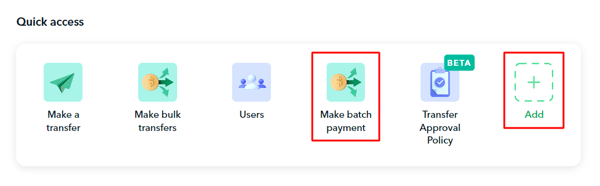
2\. Click on **Make Batch Payment** under Quick Access. If you don't have it yet, click **Add,** find the **Make Batch Payment** widget, and click **Save**.
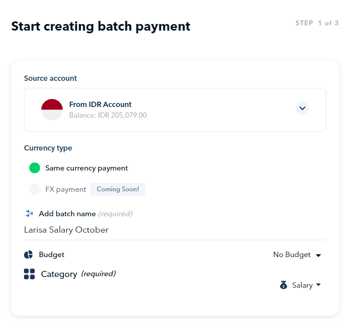
3\. Start creating your batch payment
- Choose IDR as your **Source account**
- Add your **batch payment name**
- Link your batch payment transfer to a **budget** (optional)
- **Choose a category** for your batch payment transfers (required)
- Click **Next**
****
4\. Upload recipient and transfer details
- You can upload your own CSV file. Make sure the file size is less than 10MB and has the following columns: **Recipient Account holder name, Account number, Bank code and the Transfer amount.**
- Otherwise, you can also use our template by clicking on **Aspire's IDR batch payment template.** When downloading Aspire's IDR batch payment template, you may select .**CSV** or.**XLSX** format.
**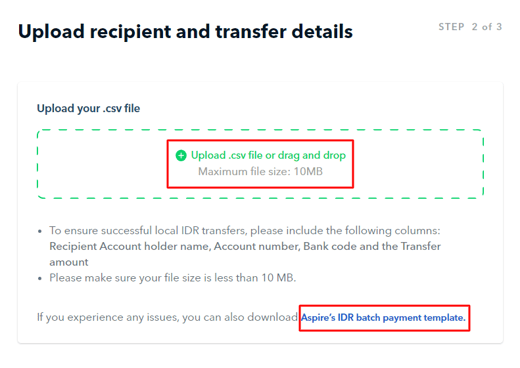**
- To ensure the numbers under **Account Number** are not truncated and still intact, please input them as a "**Text Field**". Additionally, ensure there is no space, hyphen (-), or other symbol in the Account Number section.
-1.png?width=688&height=440&name=FAQ%20Screenshots%20(3)-1.png)
- Once uploaded, click **Next.**
5\. Match the .csv columns accordingly between the **Aspire fields** and **Your .csv fields,** then hit **"Review"**
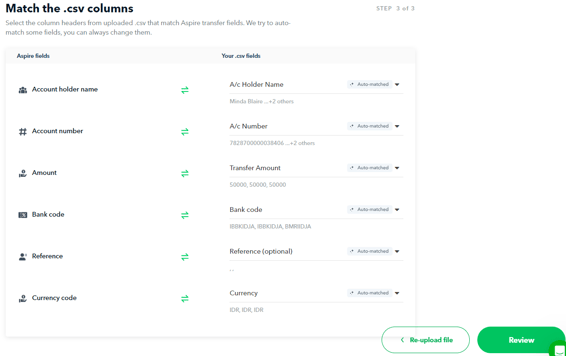
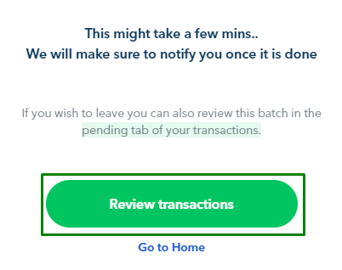
6\. It will take a few minutes to upload your batch payment, you can always come back to it later by finding it under your **Pending Transactions.** Otherwise, you can click on **"Review transactions"**
****
7\. **Review** the details of your batch payment.
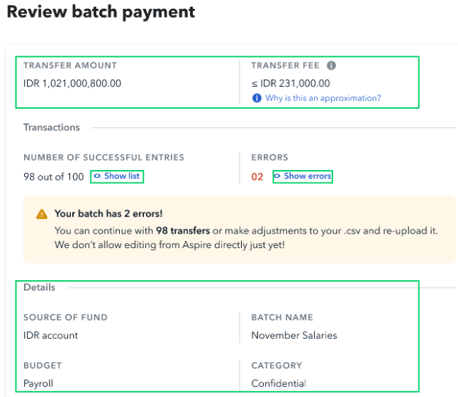
**Note!** Transfer fees are determined by the payment method supported by the destination bank. We generally send all local IDR transfers via BI-FAST.
However, if the destination bank does not support BI-FAST transfers, we'll use alternatives (RTOL/SKN/RTGS) that may take longer.
You can view the exact fee breakdown on the transfer detail page post-transaction.
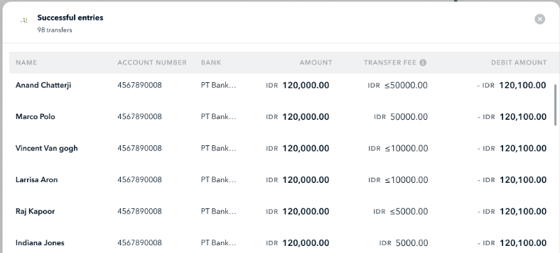
Click on to see the approximate fee breakdown per successful entry.
Click on  to review unsuccessful entries.
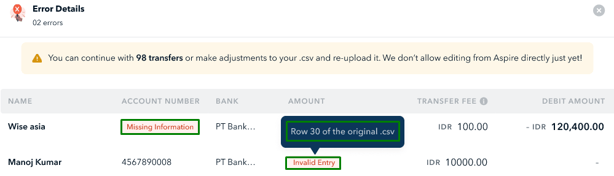
If there are any errors, you can amend the relevant items on the .csv file and **Re-upload file.**
****
8\. Once the batch payment is good to go, click on **Send transfers for approval.**
**Notes:**
- The batch payment transfers will also follow the[transfer approval policy](https://support.aspireapp.com/faq/what-is-a-transfer-approval-policy?hsLang=en) that has been set in place (if any). In this scenario, the approvals needed are determined based on the **total amount included in the CSV file**, NOT based on each individual transfer.
- Users who can make batch payment transfers are **Admin, Finance with transfer rights, and Finance with submit-only rights.**
- Currently, the batch payment feature for IDR currency is **only available for the same currency transfers** (IDR to IDR).
**Ada pertanyaan?** Silakan login ke aplikasi Aspire dan hubungi kami melalui chatbox di pojok kanan bawah.
---
**Ingin memberikan saran**? Beri tahu kami [di sini](https://share.hsforms.com/1evjyDRi7QaeWEzRPHgfa7Aclt5p?referring_page_website_from_form=How%20to%20make%20batch%20payment%20transfers%20using%20your%20IDR%20Account?).
- [Account Opening](https://support.aspireapp.com/migration/faq/id/account-opening?hsLang=en#main-content)
- [About Us](https://support.aspireapp.com/migration/faq/id/account-opening?hsLang=en#about-us)
- [Account Opening & Eligibility](https://support.aspireapp.com/migration/faq/id/account-opening?hsLang=en#account-opening-eligibility)
- [Other FAQs](https://support.aspireapp.com/migration/faq/id/account-opening?hsLang=en#other-faqs)
- [Account Management](https://support.aspireapp.com/migration/faq/id/account-management?hsLang=en#main-content)
- [Notification Settings](https://support.aspireapp.com/migration/faq/id/account-management?hsLang=en#notification-settings)
- [Multi-User Access](https://support.aspireapp.com/migration/faq/id/account-management?hsLang=en#multi-user-access)
- [Account Details](https://support.aspireapp.com/migration/faq/id/account-management?hsLang=en#account-details)
- [Account Closure](https://support.aspireapp.com/migration/faq/id/account-management?hsLang=en#account-closure)
- [Approval Policy](https://support.aspireapp.com/migration/faq/id/account-management?hsLang=en#approval-policy)
- [Account Analytics](https://support.aspireapp.com/migration/faq/id/account-management?hsLang=en#account-analytics)
- [Receipt Management](https://support.aspireapp.com/migration/faq/id/receipt-management?hsLang=en)
- [SGD Account](https://support.aspireapp.com/migration/faq/id/sgd-account?hsLang=en#main-content)
- [General](https://support.aspireapp.com/migration/faq/id/sgd-account?hsLang=en#general)
- [Send Locally](https://support.aspireapp.com/migration/faq/id/sgd-account?hsLang=en#send-locally)
- [Receive Locally](https://support.aspireapp.com/migration/faq/id/sgd-account?hsLang=en#receive-locally)
- [Send Internationally](https://support.aspireapp.com/migration/faq/id/sgd-account?hsLang=en#send-internationally)
- [Receive Internationally](https://support.aspireapp.com/migration/faq/id/sgd-account?hsLang=en#receive-internationally)
- [USD Account](https://support.aspireapp.com/migration/faq/id/usd-account?hsLang=en#main-content)
- [About your Aspire USD Account](https://support.aspireapp.com/migration/faq/id/usd-account?hsLang=en#about-your-aspire-usd-account)
- [Eligibility](https://support.aspireapp.com/migration/faq/id/usd-account?hsLang=en#eligibility)
- [Managing your Aspire USD Account](https://support.aspireapp.com/migration/faq/id/usd-account?hsLang=en#managing-your-aspire-usd-account)
- [Send Money](https://support.aspireapp.com/migration/faq/id/usd-account?hsLang=en#send-money)
- [Receive Money](https://support.aspireapp.com/migration/faq/id/usd-account?hsLang=en#receive-money)
- [IDR Account](https://support.aspireapp.com/migration/faq/id/idr-account?hsLang=en#main-content)
- [All about IDR Account](https://support.aspireapp.com/migration/faq/id/idr-account?hsLang=en#all-about-idr-account)
- [Managing IDR Account](https://support.aspireapp.com/migration/faq/id/idr-account?hsLang=en#managing-idr-account)
- [Send Money](https://support.aspireapp.com/migration/faq/id/idr-account?hsLang=en#send-money)
- [Receive Money](https://support.aspireapp.com/migration/faq/id/idr-account?hsLang=en#receive-money)
- [EUR Account](https://support.aspireapp.com/migration/faq/id/eur-account?hsLang=en#main-content)
- [Eligibility](https://support.aspireapp.com/migration/faq/id/eur-account?hsLang=en#eligibility)
- [About your Aspire EUR Account](https://support.aspireapp.com/migration/faq/id/eur-account?hsLang=en#about-your-aspire-eur-account)
- [Send Money](https://support.aspireapp.com/migration/faq/id/eur-account?hsLang=en#send-money)
- [Receive Money](https://support.aspireapp.com/migration/faq/id/eur-account?hsLang=en#receive-money)
- [GBP Account](https://support.aspireapp.com/migration/faq/id/gbp-account?hsLang=en#main-content)
- [Eligibility](https://support.aspireapp.com/migration/faq/id/gbp-account?hsLang=en#eligibility)
- [About your Aspire GBP Account](https://support.aspireapp.com/migration/faq/id/gbp-account?hsLang=en#about-your-aspire-gbp-account)
- [Send Money](https://support.aspireapp.com/migration/faq/id/gbp-account?hsLang=en#send-money)
- [Receive Money](https://support.aspireapp.com/migration/faq/id/gbp-account?hsLang=en#receive-money)
- [Cards](https://support.aspireapp.com/migration/faq/id/cards?hsLang=en#main-content)
- [General Card Information](https://support.aspireapp.com/migration/faq/id/cards?hsLang=en#general-card-information)
- [Physical Card](https://support.aspireapp.com/migration/faq/id/cards?hsLang=en#physical-card)
- [Advance Cards](https://support.aspireapp.com/migration/faq/id/cards?hsLang=en#advance-cards)
- [Debit Cards](https://support.aspireapp.com/migration/faq/id/cards?hsLang=en#debit-cards)
- [Spend Management](https://support.aspireapp.com/migration/faq/id/spend-management?hsLang=en#main-content)
- [Bills](https://support.aspireapp.com/migration/faq/id/spend-management?hsLang=en#bills)
- [Budgets](https://support.aspireapp.com/migration/faq/id/spend-management?hsLang=en#budgets)
- [Claims](https://support.aspireapp.com/migration/faq/id/spend-management?hsLang=en#claims)
- [Revenue Management](https://support.aspireapp.com/migration/faq/id/revenue-management?hsLang=en#main-content)
- [General](https://support.aspireapp.com/migration/faq/id/revenue-management?hsLang=en#general)
- [Invoices](https://support.aspireapp.com/migration/faq/id/revenue-management?hsLang=en#invoices)
- [Payment Link](https://support.aspireapp.com/migration/faq/id/revenue-management?hsLang=en#payment-link)
- [Payment Gateway](https://support.aspireapp.com/migration/faq/id/revenue-management?hsLang=en#payment-gateway)
- [Accounting Integrations](https://support.aspireapp.com/migration/faq/id/accounting-integrations?hsLang=en#main-content)
- [Category Management](https://support.aspireapp.com/migration/faq/id/accounting-integrations?hsLang=en#category-management)
- [Export Data](https://support.aspireapp.com/migration/faq/id/accounting-integrations?hsLang=en#export-data)
- [QuickBooks](https://support.aspireapp.com/migration/faq/id/accounting-integrations?hsLang=en#quickbooks)
- [NetSuite](https://support.aspireapp.com/migration/faq/id/accounting-integrations?hsLang=en#netsuite)
- [Zoho Expense](https://support.aspireapp.com/migration/faq/id/accounting-integrations?hsLang=en#zoho-expense)
- [Xero](https://support.aspireapp.com/migration/faq/id/accounting-integrations?hsLang=en#xero)
- [SAP Business One](https://support.aspireapp.com/migration/faq/id/accounting-integrations?hsLang=en#sap-business-one)
- [Jurnal](https://support.aspireapp.com/migration/faq/id/accounting-integrations?hsLang=en#jurnal)
- [Accurate](https://support.aspireapp.com/migration/faq/id/accounting-integrations?hsLang=en#accurate)
- [Subscription Plan](https://support.aspireapp.com/migration/faq/id/subscription-plan?hsLang=en#main-content)
- [Services & Value](https://support.aspireapp.com/migration/faq/id/subscription-plan?hsLang=en#services-value)
- [Billing](https://support.aspireapp.com/migration/faq/id/subscription-plan?hsLang=en#billing)
- [Payment Platforms](https://support.aspireapp.com/migration/faq/id/payment-platforms?hsLang=en#main-content)
- [Qoo10](https://support.aspireapp.com/migration/faq/id/payment-platforms?hsLang=en#qoo10)
- [Shopify](https://support.aspireapp.com/migration/faq/id/payment-platforms?hsLang=en#shopify)
- [Lazada](https://support.aspireapp.com/migration/faq/id/payment-platforms?hsLang=en#lazada)
- [PayPal](https://support.aspireapp.com/migration/faq/id/payment-platforms?hsLang=en#paypal)
- [Shopee](https://support.aspireapp.com/migration/faq/id/payment-platforms?hsLang=en#shopee)
- [Stripe](https://support.aspireapp.com/migration/faq/id/payment-platforms?hsLang=en#stripe)
- [Apple App Store](https://support.aspireapp.com/migration/faq/id/payment-platforms?hsLang=en#apple-app-store)
- [Safety and Security](https://support.aspireapp.com/migration/faq/id/safety-and-security?hsLang=en#main-content)
- [Funds Safety](https://support.aspireapp.com/migration/faq/id/safety-and-security?hsLang=en#funds-safety)
- [Security and Fraud Controls](https://support.aspireapp.com/migration/faq/id/safety-and-security?hsLang=en#security-and-fraud-controls)
- [Personal Data Protection Act (PDPA)](https://support.aspireapp.com/migration/faq/id/safety-and-security?hsLang=en#personal-data-protection-act-pdpa)
- [Other Queries](https://support.aspireapp.com/migration/faq/id/safety-and-security?hsLang=en#other-queries)
- [Others](https://support.aspireapp.com/migration/faq/id/others?hsLang=en)
[](https://aspireapp.com)
[mailto:email@email.com](mailto:email@email.com)
Copyright © 2026, Aspire