---
title: How to submit a bill?
description: Let our AI take care of the data entry when you submit a bill - which you can do in two ways!
---
[Skip to content](https://support.aspireapp.com/migration/faq/id/how-to-submit-a-bill#main-content)
- [English](https://support.aspireapp.com/migration/faq/id/how-to-submit-a-bill)
- [Bahasa Indonesia](https://support.aspireapp.com/migration/id/faq/id/bagaimana-cara-mengajukan-bills-tagihan)
English
Show submenu for translations
![Aspire Logo 202011-Sep-07-2023-03-11-02-4248-AM.webp\]](https://support.aspireapp.com/hs-fs/hubfs/Aspire%20Logo%20202011-Sep-07-2023-03-11-02-4248-AM.webp?height=40&name=Aspire%20Logo%20202011-Sep-07-2023-03-11-02-4248-AM.webp)
Open main navigation
Close main navigation
- - [English](https://support.aspireapp.com/migration/faq/id/how-to-submit-a-bill)
- [Bahasa Indonesia](https://support.aspireapp.com/migration/id/faq/id/bagaimana-cara-mengajukan-bills-tagihan)
English
Show submenu for translations
- [Go to aspireapp.com/id](https://aspireapp.com/id)
[Go to aspireapp.com/id](https://aspireapp.com/id)
How can we help?
- There are no suggestions because the search field is empty.
1. [Aspire FAQs - Indonesia](https://support.aspireapp.com/migration/faq/id?hsLang=en)
2. [Spend Management](https://support.aspireapp.com/migration/faq/id/spend-management?hsLang=en)
3. [Bills](https://support.aspireapp.com/migration/faq/id/spend-management?hsLang=en#bills)
# How to submit a bill?
## Let our AI take care of the data entry when you submit a bill - which you can do in two ways!
**Admin, Finance and Employee users** can submit Bills to Aspire in two ways: upload the bills directly in-app or send them via email.
To find out which file types are supported and learn how to submit bills through each method, check out the guides below.
- [**Supported bill file types**](https://support.aspireapp.com/migration/faq/id/how-to-submit-a-bill#SupportedFile)
- [**Required invoice information for submitting bills**](https://support.aspireapp.com/migration/faq/id/how-to-submit-a-bill#RequiredInfo)
- [**How to upload bills via Aspire app**](https://support.aspireapp.com/migration/faq/id/how-to-submit-a-bill#App)
- [**How to forward bills via email**](https://support.aspireapp.com/migration/faq/id/how-to-submit-a-bill#Email)
---
### Supported bill/invoice file types
When forwarding bills to your designated email ID or uploading it in your Aspire app, please note that only certain file formats are supported: **JPG, JPE, JPEG, PNG, GIF,** and **PDF** files.
Bills or invoices in **CSV** and **XLXS** format sent to your unique email ID will **NOT** be processed. Instead, you can send bills in CSV/XLXS formats to bills@aspireapp.com.
---
### Required invoice information for submitting Bills
For an optimal experience, please remember our guidelines as mentioned below:
- The bill/invoice you'll submit for Bills should be **addressed to your company**
- The bill/invoice should show all payment details like **bank name, account holder name, account number, and invoice amount**
- The bill/invoice should show the **supplier�s email** so we can send a notification to the supplier once the payment has been approved;
- The bill/invoice may be [in any currency.](https://support.aspireapp.com/faq/what-currency-can-i-pay-bills-in?hsLang=en)
---
### **How to upload bills in Aspire app**
You watch our video guide or follow the step-by-step guide below:
**1.** Go to **SPEND** and click on **Bills**
**2.** Click on **? New Bill** and upload your **bill/invoice** for payment
**3.** Choose **Yes, Autofill** to automatically fill in Bill details, or **No, Enter Manually** to input them yourself.

**4.** If you select **Yes, Autofill**, the scanning process will automatically fill in the Bill details, Reporting, and Supported documents fields within 30 seconds.
**5.** Click "**Continue**" if all is good (*or "**Save as draft**" to access later from your Bills dashboard)*
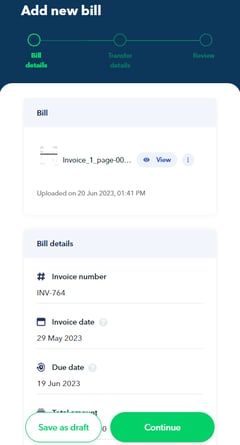 
**Note:** It is optional to fill up the Reporting and Supported documents fields when submitting a bill.
**6.** Fill in the *optional* transfer details, such as the recipient and payment details. Once done, click "**Continue**"
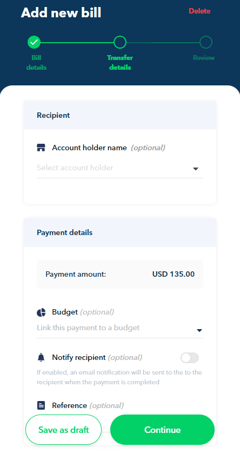
**Note:** During this stage, selecting a recipient is optional for all users. However, only Admin, Finance Users and Budget Owners with transfer rights can create new recipients.
**6.** If all details are good, click on "**Submit bill**".

Before making the payment for your bill, it will go through a review and approval process by either Admin, Finance Users, or Budget Owners (*if the bill is tied to a budget*).
This ensures that all necessary information is accurate and complete before the payment is made.
---
### **How to forward bills via email**
Forwarding bills to Aspire, either through your designated email ID or bills@aspireapp.com, depends on the file format of the bill.
Make sure to check the supported file types before submitting your bills to ensure a smooth processing experience:
- If your bills are in **JPG**, **JPE**, **JPEG**, **PNG**, **GIF**, or **PDF** file format, you can forward them to your [**designated email ID**](https://support.aspireapp.com/migration/faq/id/how-to-submit-a-bill#DesignatedEmail).
- If your bills are in **CSV** or **XLXS** format, it is best to send them to [**bills@aspireapp.com**](https://support.aspireapp.com/migration/faq/id/how-to-submit-a-bill#Bills).
#### A. Forward bills via your designated email ID
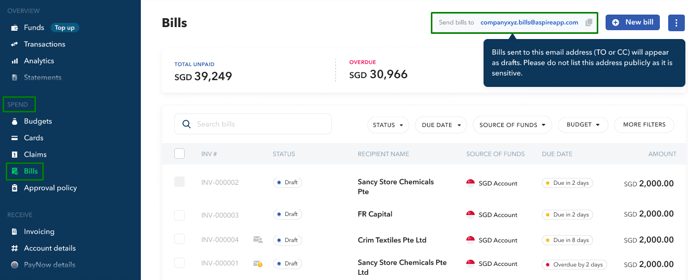
When you forward bills to your designated email ID, the OCR technology will automatically fill in the necessary details and create a draft entry for the bill.
Additionally, you can ask your vendors to send their invoices to your dedicated email ID, ensuring a smooth processing of bills on your Aspire account.
You can copy your unique email ID by going to "**Bills**" under "**Spend**" Menu.
**Related article:** [What happens when we forward bills/invoices to our unique email ID?](https://support.aspireapp.com/faq/what-happens-when-we-forward-bills-invoices-to-our-unique-email-id?hsLang=en)
#### B. Forward bills via bills@aspireapp.com
When you have bills/invoices in CSV or XLXS file format, it's best to forward them to bills@aspireapp.com.
Remember to include the supplier account details in the statement and indicate if you want to pay the full or partial amount, as the default is the full amount.
If you want to notify your client about the payment, provide their email or mobile number in your instructions.
The transfer will be created within one business day, and you'll receive a notification to approve the transfer once it's ready. You can find the invoices in the Spend \> Bills section of the Aspire platform.
**Note!** Invoices sent to bills@aspireapp.com **before 4:00 PM SGT** on a business day will be processed on that same day. Other invoices sent **after 4:00 PM SGT**, or sent on a day that is not a business day, will be processed on the next business day.
**Questions?** Please log in to the app and reach out in the chat at the bottom right corner of the screen.
---
**Suggestions?** Let us know [here](https://share.hsforms.com/1X4gc3uK1RQmgwTGVnQJg0Qclt5p?referring_page_website_from_form=How%20do%20I%20submit%20a%20bill?).
- [Account Opening](https://support.aspireapp.com/migration/faq/id/account-opening?hsLang=en#main-content)
- [About Us](https://support.aspireapp.com/migration/faq/id/account-opening?hsLang=en#about-us)
- [Account Opening & Eligibility](https://support.aspireapp.com/migration/faq/id/account-opening?hsLang=en#account-opening-eligibility)
- [Other FAQs](https://support.aspireapp.com/migration/faq/id/account-opening?hsLang=en#other-faqs)
- [Account Management](https://support.aspireapp.com/migration/faq/id/account-management?hsLang=en#main-content)
- [Notification Settings](https://support.aspireapp.com/migration/faq/id/account-management?hsLang=en#notification-settings)
- [Multi-User Access](https://support.aspireapp.com/migration/faq/id/account-management?hsLang=en#multi-user-access)
- [Account Details](https://support.aspireapp.com/migration/faq/id/account-management?hsLang=en#account-details)
- [Account Closure](https://support.aspireapp.com/migration/faq/id/account-management?hsLang=en#account-closure)
- [Approval Policy](https://support.aspireapp.com/migration/faq/id/account-management?hsLang=en#approval-policy)
- [Account Analytics](https://support.aspireapp.com/migration/faq/id/account-management?hsLang=en#account-analytics)
- [Receipt Management](https://support.aspireapp.com/migration/faq/id/receipt-management?hsLang=en)
- [SGD Account](https://support.aspireapp.com/migration/faq/id/sgd-account?hsLang=en#main-content)
- [General](https://support.aspireapp.com/migration/faq/id/sgd-account?hsLang=en#general)
- [Send Locally](https://support.aspireapp.com/migration/faq/id/sgd-account?hsLang=en#send-locally)
- [Receive Locally](https://support.aspireapp.com/migration/faq/id/sgd-account?hsLang=en#receive-locally)
- [Send Internationally](https://support.aspireapp.com/migration/faq/id/sgd-account?hsLang=en#send-internationally)
- [Receive Internationally](https://support.aspireapp.com/migration/faq/id/sgd-account?hsLang=en#receive-internationally)
- [USD Account](https://support.aspireapp.com/migration/faq/id/usd-account?hsLang=en#main-content)
- [About your Aspire USD Account](https://support.aspireapp.com/migration/faq/id/usd-account?hsLang=en#about-your-aspire-usd-account)
- [Eligibility](https://support.aspireapp.com/migration/faq/id/usd-account?hsLang=en#eligibility)
- [Managing your Aspire USD Account](https://support.aspireapp.com/migration/faq/id/usd-account?hsLang=en#managing-your-aspire-usd-account)
- [Send Money](https://support.aspireapp.com/migration/faq/id/usd-account?hsLang=en#send-money)
- [Receive Money](https://support.aspireapp.com/migration/faq/id/usd-account?hsLang=en#receive-money)
- [IDR Account](https://support.aspireapp.com/migration/faq/id/idr-account?hsLang=en#main-content)
- [All about IDR Account](https://support.aspireapp.com/migration/faq/id/idr-account?hsLang=en#all-about-idr-account)
- [Managing IDR Account](https://support.aspireapp.com/migration/faq/id/idr-account?hsLang=en#managing-idr-account)
- [Send Money](https://support.aspireapp.com/migration/faq/id/idr-account?hsLang=en#send-money)
- [Receive Money](https://support.aspireapp.com/migration/faq/id/idr-account?hsLang=en#receive-money)
- [EUR Account](https://support.aspireapp.com/migration/faq/id/eur-account?hsLang=en#main-content)
- [Eligibility](https://support.aspireapp.com/migration/faq/id/eur-account?hsLang=en#eligibility)
- [About your Aspire EUR Account](https://support.aspireapp.com/migration/faq/id/eur-account?hsLang=en#about-your-aspire-eur-account)
- [Send Money](https://support.aspireapp.com/migration/faq/id/eur-account?hsLang=en#send-money)
- [Receive Money](https://support.aspireapp.com/migration/faq/id/eur-account?hsLang=en#receive-money)
- [GBP Account](https://support.aspireapp.com/migration/faq/id/gbp-account?hsLang=en#main-content)
- [Eligibility](https://support.aspireapp.com/migration/faq/id/gbp-account?hsLang=en#eligibility)
- [About your Aspire GBP Account](https://support.aspireapp.com/migration/faq/id/gbp-account?hsLang=en#about-your-aspire-gbp-account)
- [Send Money](https://support.aspireapp.com/migration/faq/id/gbp-account?hsLang=en#send-money)
- [Receive Money](https://support.aspireapp.com/migration/faq/id/gbp-account?hsLang=en#receive-money)
- [Cards](https://support.aspireapp.com/migration/faq/id/cards?hsLang=en#main-content)
- [General Card Information](https://support.aspireapp.com/migration/faq/id/cards?hsLang=en#general-card-information)
- [Physical Card](https://support.aspireapp.com/migration/faq/id/cards?hsLang=en#physical-card)
- [Advance Cards](https://support.aspireapp.com/migration/faq/id/cards?hsLang=en#advance-cards)
- [Debit Cards](https://support.aspireapp.com/migration/faq/id/cards?hsLang=en#debit-cards)
- [Spend Management](https://support.aspireapp.com/migration/faq/id/spend-management?hsLang=en#main-content)
- [Bills](https://support.aspireapp.com/migration/faq/id/spend-management?hsLang=en#bills)
- [Budgets](https://support.aspireapp.com/migration/faq/id/spend-management?hsLang=en#budgets)
- [Claims](https://support.aspireapp.com/migration/faq/id/spend-management?hsLang=en#claims)
- [Revenue Management](https://support.aspireapp.com/migration/faq/id/revenue-management?hsLang=en#main-content)
- [General](https://support.aspireapp.com/migration/faq/id/revenue-management?hsLang=en#general)
- [Invoices](https://support.aspireapp.com/migration/faq/id/revenue-management?hsLang=en#invoices)
- [Payment Link](https://support.aspireapp.com/migration/faq/id/revenue-management?hsLang=en#payment-link)
- [Payment Gateway](https://support.aspireapp.com/migration/faq/id/revenue-management?hsLang=en#payment-gateway)
- [Accounting Integrations](https://support.aspireapp.com/migration/faq/id/accounting-integrations?hsLang=en#main-content)
- [Category Management](https://support.aspireapp.com/migration/faq/id/accounting-integrations?hsLang=en#category-management)
- [Export Data](https://support.aspireapp.com/migration/faq/id/accounting-integrations?hsLang=en#export-data)
- [QuickBooks](https://support.aspireapp.com/migration/faq/id/accounting-integrations?hsLang=en#quickbooks)
- [NetSuite](https://support.aspireapp.com/migration/faq/id/accounting-integrations?hsLang=en#netsuite)
- [Zoho Expense](https://support.aspireapp.com/migration/faq/id/accounting-integrations?hsLang=en#zoho-expense)
- [Xero](https://support.aspireapp.com/migration/faq/id/accounting-integrations?hsLang=en#xero)
- [SAP Business One](https://support.aspireapp.com/migration/faq/id/accounting-integrations?hsLang=en#sap-business-one)
- [Jurnal](https://support.aspireapp.com/migration/faq/id/accounting-integrations?hsLang=en#jurnal)
- [Accurate](https://support.aspireapp.com/migration/faq/id/accounting-integrations?hsLang=en#accurate)
- [Subscription Plan](https://support.aspireapp.com/migration/faq/id/subscription-plan?hsLang=en#main-content)
- [Services & Value](https://support.aspireapp.com/migration/faq/id/subscription-plan?hsLang=en#services-value)
- [Billing](https://support.aspireapp.com/migration/faq/id/subscription-plan?hsLang=en#billing)
- [Payment Platforms](https://support.aspireapp.com/migration/faq/id/payment-platforms?hsLang=en#main-content)
- [Qoo10](https://support.aspireapp.com/migration/faq/id/payment-platforms?hsLang=en#qoo10)
- [Shopify](https://support.aspireapp.com/migration/faq/id/payment-platforms?hsLang=en#shopify)
- [Lazada](https://support.aspireapp.com/migration/faq/id/payment-platforms?hsLang=en#lazada)
- [PayPal](https://support.aspireapp.com/migration/faq/id/payment-platforms?hsLang=en#paypal)
- [Shopee](https://support.aspireapp.com/migration/faq/id/payment-platforms?hsLang=en#shopee)
- [Stripe](https://support.aspireapp.com/migration/faq/id/payment-platforms?hsLang=en#stripe)
- [Apple App Store](https://support.aspireapp.com/migration/faq/id/payment-platforms?hsLang=en#apple-app-store)
- [Safety and Security](https://support.aspireapp.com/migration/faq/id/safety-and-security?hsLang=en#main-content)
- [Funds Safety](https://support.aspireapp.com/migration/faq/id/safety-and-security?hsLang=en#funds-safety)
- [Security and Fraud Controls](https://support.aspireapp.com/migration/faq/id/safety-and-security?hsLang=en#security-and-fraud-controls)
- [Personal Data Protection Act (PDPA)](https://support.aspireapp.com/migration/faq/id/safety-and-security?hsLang=en#personal-data-protection-act-pdpa)
- [Other Queries](https://support.aspireapp.com/migration/faq/id/safety-and-security?hsLang=en#other-queries)
- [Others](https://support.aspireapp.com/migration/faq/id/others?hsLang=en)
[](https://aspireapp.com)
[mailto:email@email.com](mailto:email@email.com)
Copyright © 2026, Aspire
```json
{
"@context" : "https://schema.org",
"@type" : "VideoObject",
"contentUrl" : "https://21172957.fs1.hubspotusercontent-na1.net/hubfs/21172957/How%20to%20upload%20Bills%20in-app.mp4",
"dateModified" : "2025-04-22T11:10:03.556Z",
"duration" : "PT2M46.817S",
"height" : 720,
"name" : "How to upload Bills in-app",
"thumbnailUrl" : "https://21172957.fs1.hubspotusercontent-na1.net/hubfs/21172957/How%20to%20upload%20Bills%20in-app.mp4/medium.jpg",
"uploadDate" : "2023-07-06T05:39:44.388Z",
"width" : 1280
}
```