---
title: How to set and remove a merchant lock for my Aspire card?
description: A merchant lock lets you set exactly where your money is spent. You can set one or multiple merchant locks per card at any time!
---
[Skip to content](https://support.aspireapp.com/migration/faq/id/how-to-set-and-remove-a-merchant-lock-for-my-aspire-card#main-content)
- [English](https://support.aspireapp.com/migration/faq/id/how-to-set-and-remove-a-merchant-lock-for-my-aspire-card)
- [Bahasa Indonesia](https://support.aspireapp.com/migration/id/faq/id/bagaimana-cara-mengatur-dan-menghapus-merchant-lock-untuk-kartu-aspire-saya)
English
Show submenu for translations
![Aspire Logo 202011-Sep-07-2023-03-11-02-4248-AM.webp\]](https://support.aspireapp.com/hs-fs/hubfs/Aspire%20Logo%20202011-Sep-07-2023-03-11-02-4248-AM.webp?height=40&name=Aspire%20Logo%20202011-Sep-07-2023-03-11-02-4248-AM.webp)
Open main navigation
Close main navigation
- - [English](https://support.aspireapp.com/migration/faq/id/how-to-set-and-remove-a-merchant-lock-for-my-aspire-card)
- [Bahasa Indonesia](https://support.aspireapp.com/migration/id/faq/id/bagaimana-cara-mengatur-dan-menghapus-merchant-lock-untuk-kartu-aspire-saya)
English
Show submenu for translations
- [Go to aspireapp.com/id](https://aspireapp.com/id)
[Go to aspireapp.com/id](https://aspireapp.com/id)
How can we help?
- There are no suggestions because the search field is empty.
1. [Aspire FAQs - Indonesia](https://support.aspireapp.com/migration/faq/id?hsLang=en)
2. [Cards](https://support.aspireapp.com/migration/faq/id/cards?hsLang=en)
3. [General Card Information](https://support.aspireapp.com/migration/faq/id/cards?hsLang=en#general-card-information)
# How to set and remove a merchant lock for my Aspire card?
## A merchant lock lets you set exactly where your money is spent. You can set one or multiple merchant locks per card at any time!
Merchant locks help give you, the employer or manager, peace of mind when creating and assigning cards for employees or freelancers. It takes less than 30 seconds to do.
**Click on the links below to see the guide on how to:**
- [**Set a merchant lock**](https://support.aspireapp.com/migration/faq/id/how-to-set-and-remove-a-merchant-lock-for-my-aspire-card#SetLock)
- [**Remove a merchant lock**](https://support.aspireapp.com/migration/faq/id/how-to-set-and-remove-a-merchant-lock-for-my-aspire-card#RemoveLock)
**Note!** Only an Admin or Budget Owner who created the card has the authority to make changes to the merchant lock.
However, an employee may request changes by following the steps provided in this [article](https://support.aspireapp.com/faq/how-to-edit-my-aspire-card-details?hsLang=en#FinanceEmployee).
### How to set a merchant lock
1. Click on "**Cards**" on the left-hand side, under "**Spend**" section
2. Search and **click on the card** you would like to add the merchant lock
3. Click on "**Edit**" in the top right corner
4. Under **Spend controls,** you can assign merchant locks based on the Merchant categories and the specific merchant itself
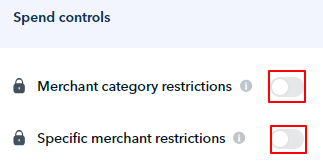
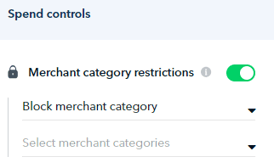
1. [**Merchant category restrictions**](https://support.aspireapp.com/faq/id/what-types-of-merchants-fall-under-the-merchant-category-restrictions?hsLang=en): Choose to **Allow** or **Block** merchants based on their category. Category examples: Advertising, Airlines, Fuel & Gas, Clothing, etc.
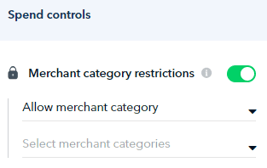
1. **Allow:** Transactions made from selected merchant categories will be allowed
2. **Block:** Transactions made from selected merchant categories will be declined
2. **Specific merchant restrictions:** Choose to **Allow** or **Block** directly on the specific merchants. Merchant examples: Air Asia, Agoda, Canva, etc.
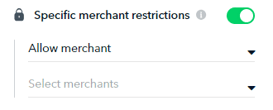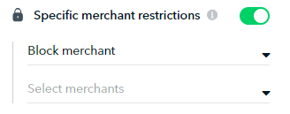
1. **Allow:** Transactions made from selected merchants will be allowed, **regardless of category restrictions.**
2. **Block:** Transactions made from selected merchants will be declined, **regardless of the category's setting (allowed).**
5. Select the merchants or categories that you want the card to be spent on by checking the appropriate box, then click "**Add categories**" and "**Add merchants**".
6. Once selected, click on "**Update Card**".
**Note:**
- **Merchant category restrictions** and **Specific merchant restrictions** can be applied at the same time.
- IDR cards that are issued by Mastercard can **only** have **1 Merchant category restriction** and **1 Specific Merchant Restriction**.
**Note:** If you can't find the merchant you need from the list, don't worry! You can simply submit a request through this [link](https://aspire-singapore.canny.io/merchant-lock). Please make sure to include the **merchant's URL** in all your requests. Our team will review it and add the merchant to our system if applicable.
### How to remove a merchant lock
1. Click on "**Cards**" on the left-hand side, under "**Spend**" section
2. Search and **click on the card** you would like to remove the merchant lock from
3. Click on "**Edit**" in the top right corner
4. Under **spend controls,** remove the merchant categories or specific merchants by clicking on them.
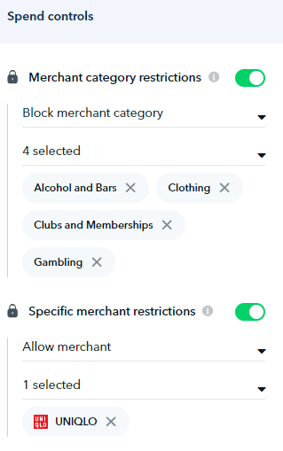
5. Once done, click on "**Update Card**"
**Questions?** Please log in to the app and reach out in the chat at the bottom right corner of the screen.
---
**Suggestions?** Let us know [here](https://share.hsforms.com/1X4gc3uK1RQmgwTGVnQJg0Qclt5p?referring_page_website_from_form=How%20to%20set%20a%20merchant%20lock%20for%20my%20Aspire%20card?).
- [Account Opening](https://support.aspireapp.com/migration/faq/id/account-opening?hsLang=en#main-content)
- [About Us](https://support.aspireapp.com/migration/faq/id/account-opening?hsLang=en#about-us)
- [Account Opening & Eligibility](https://support.aspireapp.com/migration/faq/id/account-opening?hsLang=en#account-opening-eligibility)
- [Other FAQs](https://support.aspireapp.com/migration/faq/id/account-opening?hsLang=en#other-faqs)
- [Account Management](https://support.aspireapp.com/migration/faq/id/account-management?hsLang=en#main-content)
- [Notification Settings](https://support.aspireapp.com/migration/faq/id/account-management?hsLang=en#notification-settings)
- [Multi-User Access](https://support.aspireapp.com/migration/faq/id/account-management?hsLang=en#multi-user-access)
- [Account Details](https://support.aspireapp.com/migration/faq/id/account-management?hsLang=en#account-details)
- [Account Closure](https://support.aspireapp.com/migration/faq/id/account-management?hsLang=en#account-closure)
- [Approval Policy](https://support.aspireapp.com/migration/faq/id/account-management?hsLang=en#approval-policy)
- [Account Analytics](https://support.aspireapp.com/migration/faq/id/account-management?hsLang=en#account-analytics)
- [Receipt Management](https://support.aspireapp.com/migration/faq/id/receipt-management?hsLang=en)
- [SGD Account](https://support.aspireapp.com/migration/faq/id/sgd-account?hsLang=en#main-content)
- [General](https://support.aspireapp.com/migration/faq/id/sgd-account?hsLang=en#general)
- [Send Locally](https://support.aspireapp.com/migration/faq/id/sgd-account?hsLang=en#send-locally)
- [Receive Locally](https://support.aspireapp.com/migration/faq/id/sgd-account?hsLang=en#receive-locally)
- [Send Internationally](https://support.aspireapp.com/migration/faq/id/sgd-account?hsLang=en#send-internationally)
- [Receive Internationally](https://support.aspireapp.com/migration/faq/id/sgd-account?hsLang=en#receive-internationally)
- [USD Account](https://support.aspireapp.com/migration/faq/id/usd-account?hsLang=en#main-content)
- [About your Aspire USD Account](https://support.aspireapp.com/migration/faq/id/usd-account?hsLang=en#about-your-aspire-usd-account)
- [Eligibility](https://support.aspireapp.com/migration/faq/id/usd-account?hsLang=en#eligibility)
- [Managing your Aspire USD Account](https://support.aspireapp.com/migration/faq/id/usd-account?hsLang=en#managing-your-aspire-usd-account)
- [Send Money](https://support.aspireapp.com/migration/faq/id/usd-account?hsLang=en#send-money)
- [Receive Money](https://support.aspireapp.com/migration/faq/id/usd-account?hsLang=en#receive-money)
- [IDR Account](https://support.aspireapp.com/migration/faq/id/idr-account?hsLang=en#main-content)
- [All about IDR Account](https://support.aspireapp.com/migration/faq/id/idr-account?hsLang=en#all-about-idr-account)
- [Managing IDR Account](https://support.aspireapp.com/migration/faq/id/idr-account?hsLang=en#managing-idr-account)
- [Send Money](https://support.aspireapp.com/migration/faq/id/idr-account?hsLang=en#send-money)
- [Receive Money](https://support.aspireapp.com/migration/faq/id/idr-account?hsLang=en#receive-money)
- [EUR Account](https://support.aspireapp.com/migration/faq/id/eur-account?hsLang=en#main-content)
- [Eligibility](https://support.aspireapp.com/migration/faq/id/eur-account?hsLang=en#eligibility)
- [About your Aspire EUR Account](https://support.aspireapp.com/migration/faq/id/eur-account?hsLang=en#about-your-aspire-eur-account)
- [Send Money](https://support.aspireapp.com/migration/faq/id/eur-account?hsLang=en#send-money)
- [Receive Money](https://support.aspireapp.com/migration/faq/id/eur-account?hsLang=en#receive-money)
- [GBP Account](https://support.aspireapp.com/migration/faq/id/gbp-account?hsLang=en#main-content)
- [Eligibility](https://support.aspireapp.com/migration/faq/id/gbp-account?hsLang=en#eligibility)
- [About your Aspire GBP Account](https://support.aspireapp.com/migration/faq/id/gbp-account?hsLang=en#about-your-aspire-gbp-account)
- [Send Money](https://support.aspireapp.com/migration/faq/id/gbp-account?hsLang=en#send-money)
- [Receive Money](https://support.aspireapp.com/migration/faq/id/gbp-account?hsLang=en#receive-money)
- [Cards](https://support.aspireapp.com/migration/faq/id/cards?hsLang=en#main-content)
- [General Card Information](https://support.aspireapp.com/migration/faq/id/cards?hsLang=en#general-card-information)
- [Physical Card](https://support.aspireapp.com/migration/faq/id/cards?hsLang=en#physical-card)
- [Advance Cards](https://support.aspireapp.com/migration/faq/id/cards?hsLang=en#advance-cards)
- [Debit Cards](https://support.aspireapp.com/migration/faq/id/cards?hsLang=en#debit-cards)
- [Spend Management](https://support.aspireapp.com/migration/faq/id/spend-management?hsLang=en#main-content)
- [Bills](https://support.aspireapp.com/migration/faq/id/spend-management?hsLang=en#bills)
- [Budgets](https://support.aspireapp.com/migration/faq/id/spend-management?hsLang=en#budgets)
- [Claims](https://support.aspireapp.com/migration/faq/id/spend-management?hsLang=en#claims)
- [Revenue Management](https://support.aspireapp.com/migration/faq/id/revenue-management?hsLang=en#main-content)
- [General](https://support.aspireapp.com/migration/faq/id/revenue-management?hsLang=en#general)
- [Invoices](https://support.aspireapp.com/migration/faq/id/revenue-management?hsLang=en#invoices)
- [Payment Link](https://support.aspireapp.com/migration/faq/id/revenue-management?hsLang=en#payment-link)
- [Payment Gateway](https://support.aspireapp.com/migration/faq/id/revenue-management?hsLang=en#payment-gateway)
- [Accounting Integrations](https://support.aspireapp.com/migration/faq/id/accounting-integrations?hsLang=en#main-content)
- [Category Management](https://support.aspireapp.com/migration/faq/id/accounting-integrations?hsLang=en#category-management)
- [Export Data](https://support.aspireapp.com/migration/faq/id/accounting-integrations?hsLang=en#export-data)
- [QuickBooks](https://support.aspireapp.com/migration/faq/id/accounting-integrations?hsLang=en#quickbooks)
- [NetSuite](https://support.aspireapp.com/migration/faq/id/accounting-integrations?hsLang=en#netsuite)
- [Zoho Expense](https://support.aspireapp.com/migration/faq/id/accounting-integrations?hsLang=en#zoho-expense)
- [Xero](https://support.aspireapp.com/migration/faq/id/accounting-integrations?hsLang=en#xero)
- [SAP Business One](https://support.aspireapp.com/migration/faq/id/accounting-integrations?hsLang=en#sap-business-one)
- [Jurnal](https://support.aspireapp.com/migration/faq/id/accounting-integrations?hsLang=en#jurnal)
- [Accurate](https://support.aspireapp.com/migration/faq/id/accounting-integrations?hsLang=en#accurate)
- [Subscription Plan](https://support.aspireapp.com/migration/faq/id/subscription-plan?hsLang=en#main-content)
- [Services & Value](https://support.aspireapp.com/migration/faq/id/subscription-plan?hsLang=en#services-value)
- [Billing](https://support.aspireapp.com/migration/faq/id/subscription-plan?hsLang=en#billing)
- [Payment Platforms](https://support.aspireapp.com/migration/faq/id/payment-platforms?hsLang=en#main-content)
- [Qoo10](https://support.aspireapp.com/migration/faq/id/payment-platforms?hsLang=en#qoo10)
- [Shopify](https://support.aspireapp.com/migration/faq/id/payment-platforms?hsLang=en#shopify)
- [Lazada](https://support.aspireapp.com/migration/faq/id/payment-platforms?hsLang=en#lazada)
- [PayPal](https://support.aspireapp.com/migration/faq/id/payment-platforms?hsLang=en#paypal)
- [Shopee](https://support.aspireapp.com/migration/faq/id/payment-platforms?hsLang=en#shopee)
- [Stripe](https://support.aspireapp.com/migration/faq/id/payment-platforms?hsLang=en#stripe)
- [Apple App Store](https://support.aspireapp.com/migration/faq/id/payment-platforms?hsLang=en#apple-app-store)
- [Safety and Security](https://support.aspireapp.com/migration/faq/id/safety-and-security?hsLang=en#main-content)
- [Funds Safety](https://support.aspireapp.com/migration/faq/id/safety-and-security?hsLang=en#funds-safety)
- [Security and Fraud Controls](https://support.aspireapp.com/migration/faq/id/safety-and-security?hsLang=en#security-and-fraud-controls)
- [Personal Data Protection Act (PDPA)](https://support.aspireapp.com/migration/faq/id/safety-and-security?hsLang=en#personal-data-protection-act-pdpa)
- [Other Queries](https://support.aspireapp.com/migration/faq/id/safety-and-security?hsLang=en#other-queries)
- [Others](https://support.aspireapp.com/migration/faq/id/others?hsLang=en)
[](https://aspireapp.com)
[mailto:email@email.com](mailto:email@email.com)
Copyright © 2026, Aspire