---
title: How does my Advance Card billing work?
description: "To learn more about how does Advance Card billing work, simply click the link below: You may watch our video guide below or follow the steps towards the end of the article: Timestamp: 0:00 - How to ge"
---
[Skip to content](https://support.aspireapp.com/migration/faq/id/how-does-my-advance-card-billing-work#main-content)
- [English](https://support.aspireapp.com/migration/faq/id/how-does-my-advance-card-billing-work)
- [Bahasa Indonesia](https://support.aspireapp.com/migration/id/faq/id/bagaimana-cara-penagihan-kartu-advance-limit-saya)
English
Show submenu for translations
![Aspire Logo 202011-Sep-07-2023-03-11-02-4248-AM.webp\]](https://support.aspireapp.com/hs-fs/hubfs/Aspire%20Logo%20202011-Sep-07-2023-03-11-02-4248-AM.webp?height=40&name=Aspire%20Logo%20202011-Sep-07-2023-03-11-02-4248-AM.webp)
Open main navigation
Close main navigation
- - [English](https://support.aspireapp.com/migration/faq/id/how-does-my-advance-card-billing-work)
- [Bahasa Indonesia](https://support.aspireapp.com/migration/id/faq/id/bagaimana-cara-penagihan-kartu-advance-limit-saya)
English
Show submenu for translations
- [Go to aspireapp.com/id](https://aspireapp.com/id)
[Go to aspireapp.com/id](https://aspireapp.com/id)
How can we help?
- There are no suggestions because the search field is empty.
1. [Aspire FAQs - Indonesia](https://support.aspireapp.com/migration/faq/id?hsLang=en)
2. [Cards](https://support.aspireapp.com/migration/faq/id/cards?hsLang=en)
3. [Advance Cards](https://support.aspireapp.com/migration/faq/id/cards?hsLang=en#advance-cards)
# How does my Advance Card billing work?
To learn more about how does Advance Card billing work, simply click the link below:
- [How to view the Unique Reference in-App](https://support.aspireapp.com/migration/faq/id/how-does-my-advance-card-billing-work#video)
- [Billing cycle, Due date, and Billing statement](https://support.aspireapp.com/migration/faq/id/how-does-my-advance-card-billing-work#billingcycle)
- [Repayment Allocation Logic](https://support.aspireapp.com/migration/faq/id/how-does-my-advance-card-billing-work#repaymentlogic)
- [Late Fees (Late Interest and Late Penalty)](https://support.aspireapp.com/migration/faq/id/how-does-my-advance-card-billing-work#latefees)
- [How can I pay my Advance Card Bills?](https://support.aspireapp.com/migration/faq/id/how-does-my-advance-card-billing-work#howpay)
- [What must I include when making a repayment via bank transfer?](https://support.aspireapp.com/migration/faq/id/how-does-my-advance-card-billing-work#include)
- [When should I make a repayment if I choose to make a bank transfer?](https://support.aspireapp.com/migration/faq/id/how-does-my-advance-card-billing-work#banktransfer)
- [Do I still need to pay for my bill if I have already filed a dispute on certain charges?](https://support.aspireapp.com/migration/faq/id/how-does-my-advance-card-billing-work#dispute)
### **A. How to view the Unique Reference in-App**
You may watch our video guide below or follow the steps towards the end of the article:
**Timestamp:**
**0:00** - How to get the unique reference code from your Aspire app
**1:00** - How to get the unique reference code from your Advance Limit Statement
#### Step-by-step guide
**Step 1:** Navigate to Advance Tab and choose "Pay now" to see options
**Step 2:** Choose "Pay via other debit account" to see your unique repayment reference code in-app
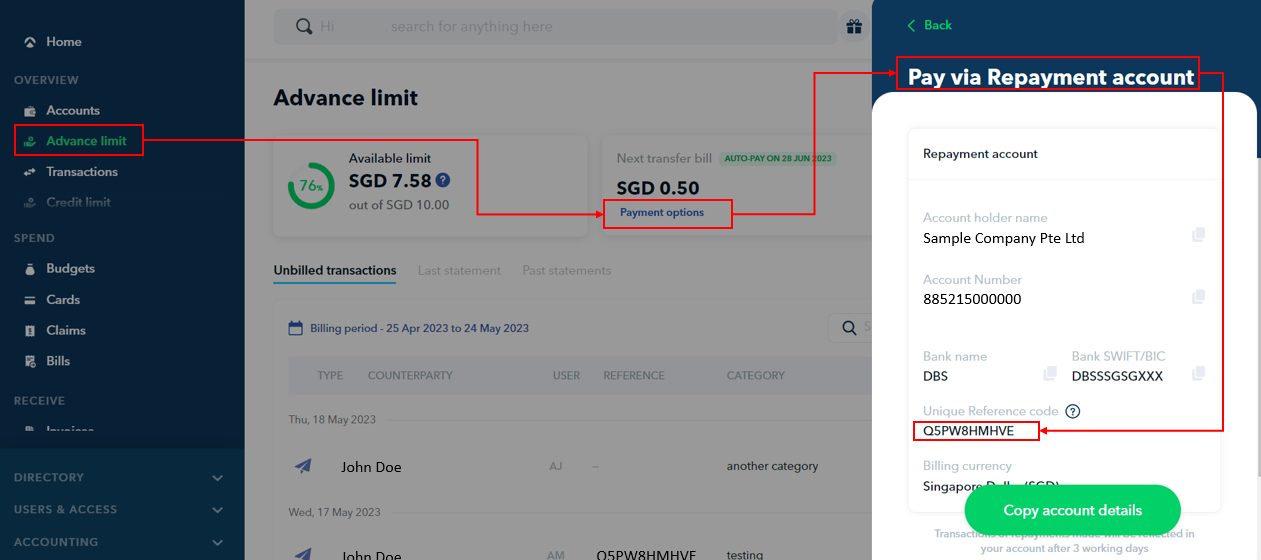
**Step 3:** Include **only** this **same** unique repayment reference code for every bill repayment when making a bank transfer under the comments/remarks section of the transfer.
Your unique repayment reference code **does not change** per bill issued and **remains the same** throughout the use of your advance limit with Aspire. You may also use the same unique repayment reference code for early repayments, and over repayments even before your bill's due date.

**Step 4:** If you wish to see the **unique repayment reference** in your bill, simply download your current bill and view the reference. It will be the **exact same reference** as what you see in-app, and will be the exact same reference in **every single bill,** which you must include in your bank transfer when making a repayment. (Image below is for illustrative purposes only)
### **B. Billing cycle, Due date, and Billing statement**
Your 30-day billing cycle **starts** on the date of your **first transaction** and **ends** 29 days later.
The **due date** for repayment will be 21 days after the end of the billing cycle.
For example, if your first transaction is on 8 Jun 22:
- **Bill 1 Cycle:** 8 Jun 22 - 07 Jul 22 | Payment Due date: 28 Jul 22
- **Bill 2 Cycle:** 8 Jul 22 - 6 Aug 22 | Payment Due date: 27 Aug 22
- **Bill 3 Cycle:** 7 Aug 22 - 5 Sep 22 | Payment Due date: 26 Sep 22
Bills are automatically sent out one day after the end date of **each billing cycle**.
For example, if your bill is from 7 Aug 22 - 5 Sep 22, the automated bill will be sent the next day on 6 Sep 22 to admins/finance user roles.
Visit our[**FAQ**](https://support.aspireapp.com/faq/how-can-i-view-my-advance-card-invoice/statement?hsLang=en) to learn how to view your Advance Card billing statement in-app.
**Note!** Automated bills are only sent out to "admin" or "finance" user roles.
The automated bill **will not be sent** if you **do not** have an "admin/finance" user role set up.
*Find out how to set your role as an admin/finance user*[***here.***](https://support.aspireapp.com/faq/how-to-upgrade-or-downgrade-an-existing-user-role?hsLang=en)
C. Repayment Allocation Logic
- If you make an overpayment for your **Advance Card bill/Advance Transfer bill,** the excess will be allocated as a repayment to your current outstanding **Advance Card bill,** which has been generated.
- If there is no advance card bill with any outstanding amounts, the repayment will be allocated to your advance card bill - for the current billing period.
- Any overpayment **will not** be allocated to another **Advance Transfer bill** in any situation.
- A fund transfer return to another account for overpaid/excess funds in your advance account **will not be possible** unless the advance facility is closed.
- We recommend that if you make a repayment for your Advance Transfer, please pay for the repayment in an exact amount, so we can allocate it to the correct bills (e.g. Your Advance Transfer bill 1 is 10,000 USD, and Advance Transfer bill 2 is 20,000. Do not pay 30,000 USD. Please pay via two separate bills of 10,000 USD and 20,000 USD each).
**Sample Scenario:**
- Bill 1 - Advance Transfer (generated) Due 10,000 USD
- Bill 2 - Advance Transfer (generated) Due 20,000 USD
- Bill 3 - Advance Card (generated) Due 15,000 USD
- Bill 4 - Advance Card (Not yet generated, Billing cycle still open)
If you happen to overpay a **non-exact amount** (e.g. 28,000 USD and inform Aspire beforehand that it is meant to be allocated to an **Advance Transfer Bill**, we will allocate it to an Advance transfer bill, and the rest to the earliest **Advance Card Bill**, and thereafter to your **current Advance Card bill**
- Bill 1 - Advance Transfer (generated) Due 10,000 USD **(Record +10,000 USD out of the 28,000 USD received)**
- Bill 2 - Advance Transfer (generated) Due 20,000 USD **(skipped)**
- Bill 3 - Advance Card (generated) Due 15,000 USD **(Record +15,000 USD out of the 28,000 USD received)**
- Bill 4 - Advance Card (Not yet generated) **(Record +3,000 USD out of the 28,000 USD received)**
### **D. Late Fees (Late Interest and Late Penalty)**
Any bill repayments after each billing cycle due date will result in a late fee of 2% late interest on the outstanding amount due, and a 50 USD (or equivalent) charge applied to your existing limit.
These fees are compounded and charged per billing cycle.
Your limit will be frozen, and once the outstanding bill amount has been paid off we will assist to review the unfreezing of your limit.
Note: In the event that inconsistent/undesirable repayment behavior is observed, or there is a change to Aspire's risk policies, Aspire reserves the right to permanently freeze or cancel your limit at any time even after a full repayment has been made.
### **E. How can I pay my Advance Card Bills?**
There are two ways to pay for your Advance Card Bills:
#### **1. Pay using your Aspire SGD, USD or IDR Account**
You can automate your Advance Card bill payment using your Aspire SGD, USD or IDR payment! Visit our[**FAQ**](https://support.aspireapp.com/faq/can-i-pay-my-advance-card-account-with-my-debit-account?hsLang=en) to learn how to set this up in your account.
#### **2. Pay via Bank Transfer to our repayment bank details**
Your billing statement shows our repayment bank details *(visit our*[***FAQ***](https://support.aspireapp.com/faq/how-do-i-pay-my-advance-card-invoice?hsLang=en) *for an example Advance Card billing statement).*
**Note:** For repayments sent via **SWIFT** there are likely to be bank charges on the sender's end. SWIFT transfers typically involve intermediary/correspondent bank fees that may be deducted from the principal amount when sent under "**SHA"** charge type. Senders are unable to select the intermediary bank, and this fee varies typically between $7 - $60 USD based on average industry charges, depending on the correspondent banks used by SWIFT network**.**
For bill repayments via **SWIFT**, we recommend you to use the "**OUR"** charge type to ensure no intermediary bank fees are deducted from the **full principal amount sent**, so that the **full amount** is received by Aspire and your bills can be marked as **repaid in full**.
If the full amount is not received by Aspire, your bill will not be marked as fully repaid, and late fees will be applied after the due date along with your limit being frozen.
### **F. What must I include when making a repayment via bank transfer?**
There are two ways to pay for your Advance Card Bills: if you choose **NOT TO** automate your Advance Card bill payment using your Aspire SGD, USD or IDR payment ([**FAQ**](https://support.aspireapp.com/faq/can-i-pay-my-advance-card-account-with-my-debit-account?hsLang=en)), and still wish to proceed with a monthly bank transfer, you **MUST** include the unique **REFERENCE** number in your transfer (comments/ notes/ reference) field if available.
This will help us to quickly identify your payment and match it to the correct advance limit account it is meant for.
- Failure to do this may result in **a delay** in recording repayments to your account, where your account **may be frozen** until we are able to identify that the funds received are meant for your advance limit account and refresh the limit.
- The **REFERENCE** is unique to your advance account per currency, and does not vary for each monthly bill issued. Thus, the **exact same REFERENCE** can be used in every bill repayment/early repayment per advance limit account.
Other than the **REFERENCE**, there is **no need** to add **additional details** as a prefix/or postfix.
#### **Sample Bank Transfer Screen**
- "A1BCDEF2GHI - Bill Payment"
- "Lavender Haze Pte. Ltd. -A1BCDEF2GHI"
- "A1BCDEF2GHI - Bill AB012345C6DEFGH"
- "A1BCDEF2GHI"
### **G. When should I make a repayment if I choose to make a bank transfer?**
We recommend for you to make the Bill repayment **at least 5 business days before** the **Due date** to ensure that funds are received on time for Aspire to refresh your limit.
A **SWIFT transfer** typically takes **3-5 business days** to be received, and we are unable to refresh your credit limit until the funds have been received by Aspire (even if a transfer proof/screenshot is provided).
### H. **Do I still need to pay for my bill if I have already filed a dispute on certain charges?**
You will still be required to pay the full outstanding amount on your bill, even if you have filed for disputes on certain transactions. Failure to pay the full outstanding bill (including the disputed spend amounts) will result in a freeze of your advance limit by the due dates, along with late fees.
Once the dispute result has been concluded (if your dispute is successful) the funds will be returned to your charge account.
Please refer to this FAQ on what to do if you[see an unauthorized transaction on your account.](https://support.aspireapp.com/faq/what-can-i-do-when-i-see-an-unauthorised-transaction-in-my-account?hsLang=en)
---
**Here are some FAQs you may find helpful:**
- [Where can I view my Advance Limit details?](https://support.aspireapp.com/faq/where-can-i-view-my-advance-limit-details?hsLang=en)
- [How can I view my Advance Card Invoice/Statement?](https://support.aspireapp.com/faq/how-can-i-view-my-advance-card-invoice/statement?hsLang=en)
- [Can I make an early repayment for my Advance card bill?](https://support.aspireapp.com/faq/can-i-make-an-early-repayment-for-my-advance-card-bill?hsLang=en)
**Questions?** Reach out in the chat at the bottom right corner of the screen.
---
**Suggestions?** Let us know [here](https://share.hsforms.com/1X4gc3uK1RQmgwTGVnQJg0Qclt5p?referring_page_website_from_form=How%20does%20my%20Advance%20Card%20billing%20work?).
- [Account Opening](https://support.aspireapp.com/migration/faq/id/account-opening?hsLang=en#main-content)
- [About Us](https://support.aspireapp.com/migration/faq/id/account-opening?hsLang=en#about-us)
- [Account Opening & Eligibility](https://support.aspireapp.com/migration/faq/id/account-opening?hsLang=en#account-opening-eligibility)
- [Other FAQs](https://support.aspireapp.com/migration/faq/id/account-opening?hsLang=en#other-faqs)
- [Account Management](https://support.aspireapp.com/migration/faq/id/account-management?hsLang=en#main-content)
- [Notification Settings](https://support.aspireapp.com/migration/faq/id/account-management?hsLang=en#notification-settings)
- [Multi-User Access](https://support.aspireapp.com/migration/faq/id/account-management?hsLang=en#multi-user-access)
- [Account Details](https://support.aspireapp.com/migration/faq/id/account-management?hsLang=en#account-details)
- [Account Closure](https://support.aspireapp.com/migration/faq/id/account-management?hsLang=en#account-closure)
- [Approval Policy](https://support.aspireapp.com/migration/faq/id/account-management?hsLang=en#approval-policy)
- [Account Analytics](https://support.aspireapp.com/migration/faq/id/account-management?hsLang=en#account-analytics)
- [Receipt Management](https://support.aspireapp.com/migration/faq/id/receipt-management?hsLang=en)
- [SGD Account](https://support.aspireapp.com/migration/faq/id/sgd-account?hsLang=en#main-content)
- [General](https://support.aspireapp.com/migration/faq/id/sgd-account?hsLang=en#general)
- [Send Locally](https://support.aspireapp.com/migration/faq/id/sgd-account?hsLang=en#send-locally)
- [Receive Locally](https://support.aspireapp.com/migration/faq/id/sgd-account?hsLang=en#receive-locally)
- [Send Internationally](https://support.aspireapp.com/migration/faq/id/sgd-account?hsLang=en#send-internationally)
- [Receive Internationally](https://support.aspireapp.com/migration/faq/id/sgd-account?hsLang=en#receive-internationally)
- [USD Account](https://support.aspireapp.com/migration/faq/id/usd-account?hsLang=en#main-content)
- [About your Aspire USD Account](https://support.aspireapp.com/migration/faq/id/usd-account?hsLang=en#about-your-aspire-usd-account)
- [Eligibility](https://support.aspireapp.com/migration/faq/id/usd-account?hsLang=en#eligibility)
- [Managing your Aspire USD Account](https://support.aspireapp.com/migration/faq/id/usd-account?hsLang=en#managing-your-aspire-usd-account)
- [Send Money](https://support.aspireapp.com/migration/faq/id/usd-account?hsLang=en#send-money)
- [Receive Money](https://support.aspireapp.com/migration/faq/id/usd-account?hsLang=en#receive-money)
- [IDR Account](https://support.aspireapp.com/migration/faq/id/idr-account?hsLang=en#main-content)
- [All about IDR Account](https://support.aspireapp.com/migration/faq/id/idr-account?hsLang=en#all-about-idr-account)
- [Managing IDR Account](https://support.aspireapp.com/migration/faq/id/idr-account?hsLang=en#managing-idr-account)
- [Send Money](https://support.aspireapp.com/migration/faq/id/idr-account?hsLang=en#send-money)
- [Receive Money](https://support.aspireapp.com/migration/faq/id/idr-account?hsLang=en#receive-money)
- [EUR Account](https://support.aspireapp.com/migration/faq/id/eur-account?hsLang=en#main-content)
- [Eligibility](https://support.aspireapp.com/migration/faq/id/eur-account?hsLang=en#eligibility)
- [About your Aspire EUR Account](https://support.aspireapp.com/migration/faq/id/eur-account?hsLang=en#about-your-aspire-eur-account)
- [Send Money](https://support.aspireapp.com/migration/faq/id/eur-account?hsLang=en#send-money)
- [Receive Money](https://support.aspireapp.com/migration/faq/id/eur-account?hsLang=en#receive-money)
- [GBP Account](https://support.aspireapp.com/migration/faq/id/gbp-account?hsLang=en#main-content)
- [Eligibility](https://support.aspireapp.com/migration/faq/id/gbp-account?hsLang=en#eligibility)
- [About your Aspire GBP Account](https://support.aspireapp.com/migration/faq/id/gbp-account?hsLang=en#about-your-aspire-gbp-account)
- [Send Money](https://support.aspireapp.com/migration/faq/id/gbp-account?hsLang=en#send-money)
- [Receive Money](https://support.aspireapp.com/migration/faq/id/gbp-account?hsLang=en#receive-money)
- [Cards](https://support.aspireapp.com/migration/faq/id/cards?hsLang=en#main-content)
- [General Card Information](https://support.aspireapp.com/migration/faq/id/cards?hsLang=en#general-card-information)
- [Physical Card](https://support.aspireapp.com/migration/faq/id/cards?hsLang=en#physical-card)
- [Advance Cards](https://support.aspireapp.com/migration/faq/id/cards?hsLang=en#advance-cards)
- [Debit Cards](https://support.aspireapp.com/migration/faq/id/cards?hsLang=en#debit-cards)
- [Spend Management](https://support.aspireapp.com/migration/faq/id/spend-management?hsLang=en#main-content)
- [Bills](https://support.aspireapp.com/migration/faq/id/spend-management?hsLang=en#bills)
- [Budgets](https://support.aspireapp.com/migration/faq/id/spend-management?hsLang=en#budgets)
- [Claims](https://support.aspireapp.com/migration/faq/id/spend-management?hsLang=en#claims)
- [Revenue Management](https://support.aspireapp.com/migration/faq/id/revenue-management?hsLang=en#main-content)
- [General](https://support.aspireapp.com/migration/faq/id/revenue-management?hsLang=en#general)
- [Invoices](https://support.aspireapp.com/migration/faq/id/revenue-management?hsLang=en#invoices)
- [Payment Link](https://support.aspireapp.com/migration/faq/id/revenue-management?hsLang=en#payment-link)
- [Payment Gateway](https://support.aspireapp.com/migration/faq/id/revenue-management?hsLang=en#payment-gateway)
- [Accounting Integrations](https://support.aspireapp.com/migration/faq/id/accounting-integrations?hsLang=en#main-content)
- [Category Management](https://support.aspireapp.com/migration/faq/id/accounting-integrations?hsLang=en#category-management)
- [Export Data](https://support.aspireapp.com/migration/faq/id/accounting-integrations?hsLang=en#export-data)
- [QuickBooks](https://support.aspireapp.com/migration/faq/id/accounting-integrations?hsLang=en#quickbooks)
- [NetSuite](https://support.aspireapp.com/migration/faq/id/accounting-integrations?hsLang=en#netsuite)
- [Zoho Expense](https://support.aspireapp.com/migration/faq/id/accounting-integrations?hsLang=en#zoho-expense)
- [Xero](https://support.aspireapp.com/migration/faq/id/accounting-integrations?hsLang=en#xero)
- [SAP Business One](https://support.aspireapp.com/migration/faq/id/accounting-integrations?hsLang=en#sap-business-one)
- [Jurnal](https://support.aspireapp.com/migration/faq/id/accounting-integrations?hsLang=en#jurnal)
- [Accurate](https://support.aspireapp.com/migration/faq/id/accounting-integrations?hsLang=en#accurate)
- [Subscription Plan](https://support.aspireapp.com/migration/faq/id/subscription-plan?hsLang=en#main-content)
- [Services & Value](https://support.aspireapp.com/migration/faq/id/subscription-plan?hsLang=en#services-value)
- [Billing](https://support.aspireapp.com/migration/faq/id/subscription-plan?hsLang=en#billing)
- [Payment Platforms](https://support.aspireapp.com/migration/faq/id/payment-platforms?hsLang=en#main-content)
- [Qoo10](https://support.aspireapp.com/migration/faq/id/payment-platforms?hsLang=en#qoo10)
- [Shopify](https://support.aspireapp.com/migration/faq/id/payment-platforms?hsLang=en#shopify)
- [Lazada](https://support.aspireapp.com/migration/faq/id/payment-platforms?hsLang=en#lazada)
- [PayPal](https://support.aspireapp.com/migration/faq/id/payment-platforms?hsLang=en#paypal)
- [Shopee](https://support.aspireapp.com/migration/faq/id/payment-platforms?hsLang=en#shopee)
- [Stripe](https://support.aspireapp.com/migration/faq/id/payment-platforms?hsLang=en#stripe)
- [Apple App Store](https://support.aspireapp.com/migration/faq/id/payment-platforms?hsLang=en#apple-app-store)
- [Safety and Security](https://support.aspireapp.com/migration/faq/id/safety-and-security?hsLang=en#main-content)
- [Funds Safety](https://support.aspireapp.com/migration/faq/id/safety-and-security?hsLang=en#funds-safety)
- [Security and Fraud Controls](https://support.aspireapp.com/migration/faq/id/safety-and-security?hsLang=en#security-and-fraud-controls)
- [Personal Data Protection Act (PDPA)](https://support.aspireapp.com/migration/faq/id/safety-and-security?hsLang=en#personal-data-protection-act-pdpa)
- [Other Queries](https://support.aspireapp.com/migration/faq/id/safety-and-security?hsLang=en#other-queries)
- [Others](https://support.aspireapp.com/migration/faq/id/others?hsLang=en)
[](https://aspireapp.com)
[mailto:email@email.com](mailto:email@email.com)
Copyright © 2026, Aspire
```json
{
"@context" : "https://schema.org",
"@type" : "VideoObject",
"contentUrl" : "https://21172957.fs1.hubspotusercontent-na1.net/hubfs/21172957/How%20to%20see%20the%20Advance%20Limit%20reference%20code%20(2).mp4",
"dateModified" : "2025-04-22T11:05:03.612Z",
"duration" : "PT2M22.911S",
"height" : 1080,
"name" : "How to see the Advance Limit reference code (2)",
"thumbnailUrl" : "https://21172957.fs1.hubspotusercontent-na1.net/hubfs/21172957/How%20to%20see%20the%20Advance%20Limit%20reference%20code%20(2).mp4/medium.jpg",
"uploadDate" : "2023-05-30T10:49:14.138Z",
"width" : 1920
}
```