![Circle.png]](https://support.aspireapp.com/hs-fs/hubfs/Circle.png?height=40&name=Circle.png)
Note:
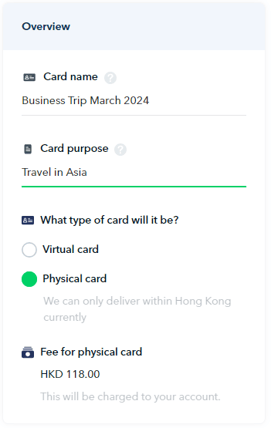
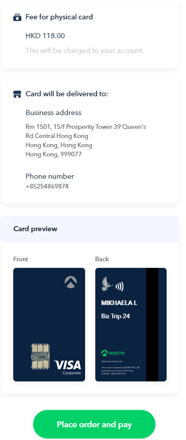
- Each physical card costs HKD 118, which will be deducted from your HKD account. You will receive an email with your invoice and payment confirmation.
- Physical cards can only be shipped within Hong Kong. Please contact support for more details.
- Once the card is issued to a specific user, you can no longer re-assign it to another user and change the card's source of funds.
Admin users and Budget Owners can create a physical card directly in-app.
Meanwhile, Finance and Employee users will need to request the physical card in-app, which will be sent to Admin users for approval before the physical card is issued.
Admin users or Budget Owners
To create a physical card, follow the steps below:
- Log in to your Aspire Account
- Under SPEND click on "Cards"
- Click on the blue "➕ New card" on the right-hand side
- Choose the intended recipient of the card
- Enter the card name and card's purpose, then select "Physical Card" under the "What type of card will it be" section.
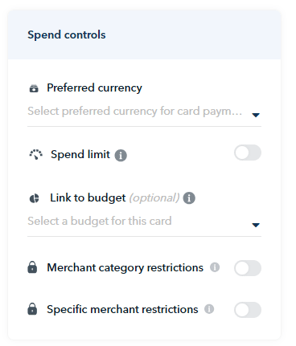
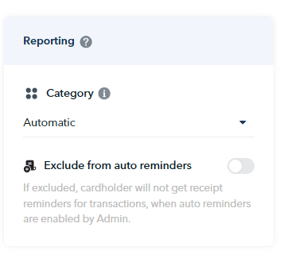
- Scroll down to continue filling out the rest of the card particulars, then click "Continue"
- Enter the cardholder name you would like to appear on the physical card. You may also change the card name. If all good, click "Continue".
Note! Physical cards have a limit of 15 characters for the Cardholder's Name. If you require more than 15 characters, please contact our Support Team on your Aspire app.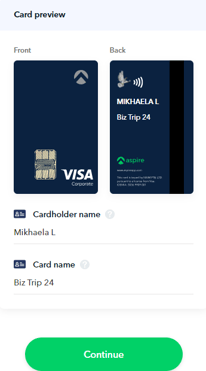
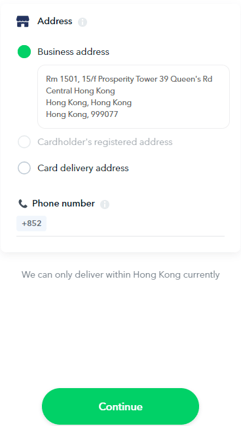
- Select the address where you would like your card to be delivered, then click "Continue". Hit "Place order and pay" after reviewing your physical card request details, and you're done! Please allow up to 10 business days for delivery.
Finance or Employee users
To request for a physical card, follow the steps below:
- Log in to your Aspire Account
- Under SPEND click on "Cards"
- Click on the blue "➕ Request a card" on the right-hand side
- Enter the card name and card's purpose, then select "Physical Card" under the "What type of card will it be" section.
- Scroll down to continue filling out the rest of the card particulars, then click "Continue"
- Enter the cardholder name you would like to appear on the physical card. You may also change the card name. If all good, click "Continue".
Note! Physical cards have a limit of 15 characters for the Cardholder's Name. If you require more than 15 characters, please contact our Support Team on your Aspire app. - Select the address where you would like your card to be delivered, then click "Continue". Hit "Place order and pay" after reviewing your physical card request details, and you're done! Please allow up to 10 business days for delivery.
Questions? Please log in to the app and reach out in the chat at the bottom right corner of the screen.
Suggestions? Let us know here.